What's New - EasyPower 2025The following are the primary features included in the EasyPower 2025 release.
Store Short Circuit and Arc Flash Analysis Results in the DatabaseStore Short Circuit and Arc Flash Results to Quickly Generate Reports- You can now store short circuit and arc flash analysis results in your one-line database. A new menu below the Short Circuit button has additional options for you to store or clear results. You can quickly generate and store a wide variety of results for various short circuit and arc flash parameters in the database.
Display Short Circuit and Arc Flash Results in the Reports or Browser- New report configurations are available so that you can create typical analysis reports with the stored results. You can use the configurations we provide or use them as templates to create your own custom configurations.
Display Stored Results on the One-Line- You can use one-line text templates to display the stored results on the one-line. The one-line text templates are now easily accessible from the Home menu while you are in the Database Edit focus, enabling you to quickly and easily display different data text blocks on your one-line diagrams.
- You can use the text templates we provide or use them to create your own text templates.
Display the Arc Flash Calculation Method in Reports and Arc Flash Labels- There is a new column available for arc flash reports that displays the arc flash calculation method used for each bus. You can add this column to your custom report configurations.
- You can also add the arc flash calculation method to arc flash labels in the Label Designer.
Advanced Query to Select kV Range and Bus Type- There are new query options for kV Range and Bus Type available on the Advanced tab of the Query dialog box. You could use this to select high voltage open air buses quickly and to perform just the single line-to-ground faults on those buses, for example.
Arc Flash Schedule Variables Now Display Units Based on Arc Flash Hazard Settings- Several schedule variables for arc flash results have been renamed and now use the units set up in the Arc Flash Hazard settings to ensure consistency with the Database Browser and one-line text templates.
Arc Flash Report Columns Renamed- Several columns in reports related to the trip device for arc flash have been renamed to reduce confusion, since the device that is being referred to is not always immediately upstream, as the name would seem to indicate.
Set Default for the "Use 100% Convention for Displaying Analysis Overloads/Overduties" Option- In the system Options dialog box, after you select or clear the checkbox for the Use 100% convention for displaying analysis overloads/overduties option, you can use Set Default to save your selection as the default value for all new one-lines. This stores the setting in the file with the project.
Scenario Manager - Store Short Circuit and Arc Flash Analysis ResultsStore Short Circuit and Arc Flash Analysis ResultsWhile in a scenario, you can fault and store short circuit and arc flash results just as you can in the Base Case.
Store Worst Case Arc Flash ResultsAfter running the Scenario Comparison Report, you now have the option to store the worst case arc flash results for each bus, MCC, panel, or ATS in the report. These are displayed in the equipment data dialog boxes on the Panelboard, Switchboard, or Switchgear tab of a bus, the Summary tab of a panel or MCC, and the Specifications tab of an ATS. These results are also available to include in the Database Browser and Database Report configurations, in schedules, and in custom one-line text templates.
New Schedule Variables for Worst Case Arc Flash ResultsThere are new schedule variables for the worst case arc flash results that you can add to your schedules. These include:
- %AFWorstBoundary%
- %AFWorstIncidentEnergy%
- %AFWorstPPELevel%
- %AFWorstWorkingDistance%
- %AFWorstScenario%
Clear Worst Case Arc Flash ResultsThere is a new option when viewing the Base Case to clear the worst case arc flash results that were previously stored. This clears the results for the selected equipment or for all applicable equipment if nothing is selected.
Database Browser and Report EnhancementsCustomize Report Column Names for Configuration Files- When you create a configuration file for the Database Browser or Database Report, you can now create customized column header names for the report columns.
- The custom column headers are specific to the configuration. Each configuration can have a different custom column header for the same column name.
Specify Report Configuration File Locations- You can specify the file location of your report configurations in Tools > Options > File Locations.
Report Title is Used as the Configuration ✅File Name- When you create a configuration file for the Database Browser or Database Report, you have the option to specify a Report Title. If you enter a title, that text is used as the default ✅
File Name for the configuration file. You can still change the name if you want something different. This saves you time when creating a new configuration file.
Notes Added to the Configuration File Can Be Included in Reports- There is a new Notes box for the Database Browser and Report configuration file. If you select the Include notes on report header checkbox, the first two lines of the note are shown in the header of the report output or when exporting to Excel.
Use Filters to Modify the Results Displayed- You can create filters for equipment items in the configuration file. After selecting an equipment item, click the Filter tab, and then specify the Filter by criteria. You can use Add Filter Condition to apply additional filters to the equipment.
- You could use this, for example, to create separate reports for low voltage and high voltage equipment, or for AC or DC equipment. The filters are saved with the configuration.
Test Standard Columns Added to the Database Browser and Reports- Several new columns have been added for various equipment items to display the test standard applied.
Database Report Fit to Page Option Added- A new Fit to Page option in the Database Report reduces the font size to fit all the columns in the report onto one page.
Database Browser Performance Improvements- We have optimized the performance of the Database Browser to improve the user experience and to prepare for future enhancements.
Improved Access to Analysis OptionsOpen Analysis Options from Within the Home Tab- While viewing the Home tab in the Database Edit focus, you can now view and edit the analysis options by selecting the arrow below the each of the focus buttons for Short Circuit, Coordination, Power Flow, Harmonics, and Dynamic Stability/Transient Motor Starting.
One-line Text Template Improvements- You can now create, edit, and select one-line text templates from the Home menu. Use text templates to quickly display the exact information you want shown on the one-line.
- You can choose to embed a custom template in the one-line so that it is automatically used for everyone who opens the one-line.
- This simplifies the use of text templates and eliminates the need to import and export text template files.
Short Circuit EnhancementsNew Elements-Based Short Circuit Calculation Method- We have replaced the symmetrical components (sequence-based) short circuit calculation method with a new physical elements-based method that produces the same results as the symmetrical components method while also enabling the modeling of unbalanced networks. These efforts will enable us to make significant enhancements in future releases.
Short Circuit Option for Setting Driving Point Voltage- A new method is now available for setting the driving point voltage at individual sources. There are new options in the Short Circuit Options - Control tab for applying driving point voltage. The choices are Faulted bus or Sources. The classical short circuit method described in the ANSI/IEEE guide applies the driving point voltage at the faulted bus. Now, you can apply the driving point voltage to the Thevenin equivalent voltage of all sources to take the source voltage into account.
Short Circuit Option for Including Line Capacitance and Shunts- You can now include line capacitance and shunts in the short circuit calculations. You can include cable and transmission line capacitance and capacitors into the network in short circuit calculations if those options are enabled. This could effectively improve the accuracy of the short circuit solutions in high capacitance networks such as the collector system of a renewable power plant or a cable feed industrial network.
Single-Phase Base MVA Option- You can now specify the single-phase base MVA to either be one-third of the system base MVA or equal to the system base MVA. This affects the per-unit calculations for branches that include single-phase cables or transmission lines.
Misc. EnhancementsAuto-Calculate Z% for Two-Winding Transformers- There is now an Auto-calculate checkbox to populate the Z%, X/R ratio, grounding impedance, and amp class values on two-winding transformers with typical industry values based on the transformer's characteristics.
Support for 64-Bit- EasyPower is now a 64-bit application. This improves performance and enables EasyPower to better handle larger files.
Characteristic Current Method Removed- In Short Circuit Options, the X/R calculation method for Characteristic Current has been removed. Any existing one-line file set with this option will now use the ANSI method.
X/R Calculation Removed from TCC Options- The X/R Calculation Method options in the TCC Options dialog box were redundant and have been removed. The program uses the X/R Calculation Method specified in the Short Circuit Options.
Legacy Arc Flash Calculation Methods Removed- On the Arc Flash Hazards tab in the Short Circuit Options dialog box, under Standard, the V6.0 Enhanced and V7.0 Enhanced options have been removed. These were created to cover the gaps in the 2002 edition of the IEEE 1584 standard and are now outdated with the adoption of 1584-2018.
- Any existing file with either of these standards selected will be set to the latest IEEE 1584 standard.
Arc Flash Open Air Method Renamed- In the Advanced Arc Flash Options dialog box, the open air option to Apply NFPA 70E 2009 Annex D.8 is now Apply HV Open Air Method. The method is still based on NFPA 70E 2009 Annex D.8.
Revit EnhancementsRevit 2025 SupportThe EasyPower Integrator for Revit now supports the 2025 version of Autodesk Revit. You can download the EasyPower Integrator app from the Autodesk App Store. The App Store will be updated with the latest version shortly after the EasyPower 2025 release, so please verify the version prior to downloading. Transformer Impedance Uses the Auto-Calculate Value for Revit Imports. When importing transformer information to EasyPower from Revit, if the default for the impedance Z% value is set to auto-calculate and there is no value deliberately set by mapping, EasyPower uses the auto-calculated value to determine the impedance. If there is no mapping and auto-calculate is not selected, the value is left blank.
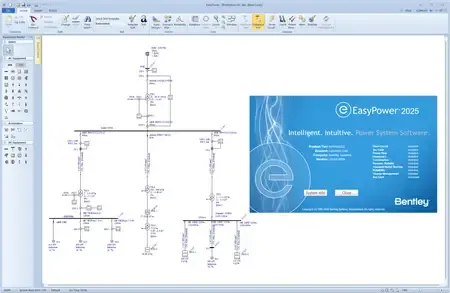 The EasyPower product suite
 delivers a full lineup of powerful electrical software tools for intelligently designing, analyzing, and monitoring electrical power systems. With the fastest processing speeds on the market, EasyPower delivers instantaneous, accurate results to help you make more intelligent decisions. Watch the overview video below to learn more.
Introduction to EasyPower: Power System Analysis SoftwareBentley Systems, Inc. is the global leader dedicated to providing architects, engineers, constructors, and owner-operators with comprehensive architecture and engineering software solutions for sustaining infrastructure. Founded in 1984, Bentley has nearly 3,000 colleagues in more than 45 countries, $500 million in annual revenues, and, since 2001, has invested more than $1 billion in research, development, and acquisitions.
Сopyright holder \ Distributor:EasyPower part of Bentley Systems
Product Name:EasyPower
Version:2025 (25.00.00.8059)
Supported Architectures:x64
Website Home Page :www.bentley.comLanguages Supported:english
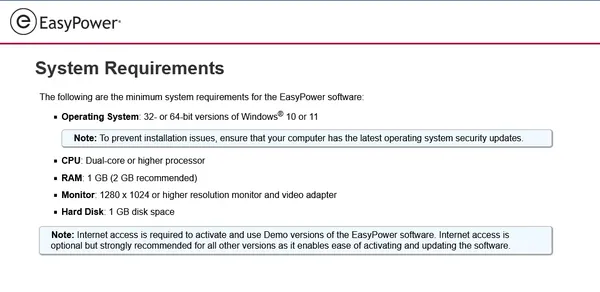
System Requirements:Windows *
Size in archive:1.0 Gb
Recovery information:3% archive

 Cantinho Satkeys
