Published 3/2026
Created by Duplo Designs
MP4 | Video: h264, 1280x720 | Audio: AAC, 44.1 KHz, 2 Ch
Level: All Levels | Genre: eLearning | Language: English | Duration: 13 Lectures ( 2h 1m ) | Size: 1.6 GB
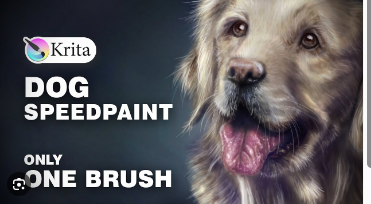
Learn digital painting with free software by creating a cute dog. Full process, beginner-friendly with expert tipsWhat you'll learn✓ Learn the basics of Krita to create digital art
✓ Find out how and where to look for good references
✓ Break down references and use them for your art
✓ Sketch accurate shapes as the basis for a painting
✓ See the correct colors and shapes and recreate them
✓ Learn to use blending brushes to create amazing unique textures
✓ Add your own touch to your artworks without messing it up
✓ Explore different brushes and tools in Krita with a practical project
✓ Learn the underlying principles of painting from references
✓ Get a few advanced art tips to help you in your journey
Requirements● A computer or tablet that can run the free software Krita (Windows/Mac/Linux/Android)
● A drawing tablet (with out without screen) if you work on a computer
DescriptionWelcome to my new course!
I've been excited about this one. I invite you to follow me through the whole process of making an artwork with Krita. This time it's a cute little dog, because I think many people like that and it gets them motivated to make digital art (and that's good ;)).
Using the comletely free and open-source software Krita (runs on Windows, Mac, Linux and even Android) and a drawing tablet of any sort (with our without screen), we'll create an amazing artwork from reference!
Making a digital painting like this is always fun and rewarding, at least if you know how to not get lost. And this is what this course is for.
I'm going to teach you the basics of using Krita, how to look for references and how to break them down, what you should pay attention to when sketching, how to make an effective sketch, where and when to block in your colors, which options to have to create detail, how to make amazing textures and the list goes on... you know all the important things it takes to make art :)
If you want more info, just watch the first few lessons and see if this is something for you.
Enjoy!
Who this course is for■ Beginner digital artists
■ People who are new to digital art
■ Intermediate artists who want advanced tips on breaking down references
■ Artists who want to explore a new artstyle and means to express themselves
https://rapidgator.net/file/d76018687ac540ced84732fddea84c39/Paint_a_Cute_Dog_in_Krita_Fun_Beginner_Digital_Art_Process.part1.rar.html
https://rapidgator.net/file/b86e36a8aa488a490a39c2ce0eb38ffc/Paint_a_Cute_Dog_in_Krita_Fun_Beginner_Digital_Art_Process.part2.rar.html
https://nitroflare.com/view/A15BFE044891855/Paint_a_Cute_Dog_in_Krita_Fun_Beginner_Digital_Art_Process.part1.rar
https://nitroflare.com/view/DF81F1AE96B4FC6/Paint_a_Cute_Dog_in_Krita_Fun_Beginner_Digital_Art_Process.part2.rar

 Cantinho Satkeys
