 Free Download Disk Sorter 17.8.12 All Editions | 85.1 Mb
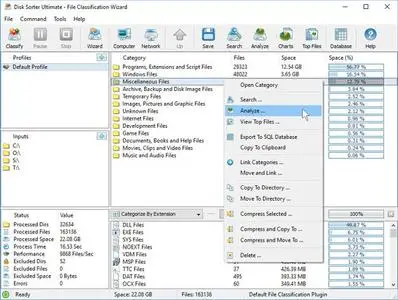
DiskSorter is a file classification solution allowing one to classify files in local disks, network shares, NAS devices and enterprise storage systems. Users are provided with the ability to gain an in-depth visibility into which types of files are using most of the disk space, save reports and perform file management operations on categories of files.
DiskSorter Main GUI Application
The DiskSorter main GUI application provides the user with the ability to classify one or more disks or directories, analyze, categorize and/or filter file classification results, export file classification reports to the HTML, PDF, Excel, XML, text or CSV formats, copy, move or delete specific file classes, class groups or individual files and much more.
File Classification Plugins
DiskSorter provides a large number of file classification plugins allowing one to classify and categorize files by the file type, extension, creation, last modification or last access dates, etc. Advanced users are provided with the ability to implement custom file classification plugins using an easy, XML-based format.
File Categories and Filters
DiskSorter is capable of categorizing and filtering file classification results by the file type, size, user name, extensions, etc. The bottom part of the main GUI application shows the available file categories and allows one to apply one or more file categories as file filters limiting the currently displayed results to the selected file categories.
File Classification Pie Charts
The pie charts dialog is capable of showing the amount of used disk space and the number of files per class, category, extension, user name, last access, modification and creation times, etc. In addition, the user is provided with the ability to copy the chart image to the clipboard allowing one to easily integrate DiskSorter charts into presentations and documents.
Classifying Files in Network Servers and NAS Storage Devices
DiskSorter allows one to scan the network, discover network servers and NAS storage devices, automatically detect all accessible network shares and classify files in hundreds of network servers and NAS storage devices.
File Classification Options
The file classification options dialog provides the ability to set the default report title, the speed of the file classification process, the number of parallel directory scanning and file classification threads, the results sorting mode, the disk space counting mode, etc.
File Classification Rules
The file classification rules dialog allows one to limit the file classification process to specific types or groups of files using one or more file matching rules.
Supported Operating Systems:Windows XP, Vista, 7, 8, 8.1, 10, 11 and Server 2003, 2008, 2008 R2, 2012, 2012 R2, 2016, 2019, 2022, 2025
Home Page-
https://www.disksorter.com/Recommend Download Link Hight Speed | Please Say Thanks Keep Topic Live
Links are Interchangeable - No Password - Single Extraction

 Cantinho Satkeys
