 Free Download 4DDiG Partition Manager 3.9.2.19 (x64) Multilingual Portable Fast Links | 60.2 Mb
4DDiG Partition Manager is a powerful Windows disk partition software expert in system migration, disk cloning and disk partition management.
An All-in-One Disk Partition Manager
- One-click migrate Windows OS to SSD without reinstalling system.
- Upgrade to a larger hard drive without data loss.
- Flexibly resize/split/create/delete/format partitions to optimize disk space.
- Effectively clone your entire hard drive to back up your data.
- Safely move installed apps & programs, system updates, drivers, custom settings from one PC to another.
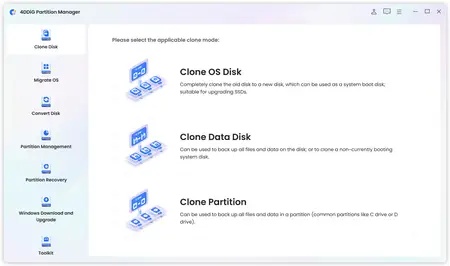
Easy & Safe Disk Cloning Software for Complete Backup
Making regular backups of your data is crucial to prevent data loss. 4DDiG Partition Manager can effectively clone your entire disk or partition, providing a reliable solution for data backup.
- Disk Cloning Mode
You can effortlessly and securely copy or transfer data from one drive to another. This feature allows you to back up your data and seamlessly upgrade to a larger hard drive without losing data.
- Partition Cloning Mode
Designed for cloning specific partition data, this mode enables you to effortlessly transfer or back up the contents of a specific partition on a drive to another partition without any data loss.
One-click OS Migration Wizard for Windows 10 & 11
Quick System & Data Transfer Solution. 4DDiG Partition Manager can migrate system and large files or folders from one disk partition to a larger one in one click.
- Migrate OS to SSD/HDD
One-click migrate your Windows OS to another HDD or SSD for better computer performance.
- Upgrade to a Larger SSD
Replace or upgrade a smaller drive to a larger one or SSD disk.
- Safely Transfer Everything
System migration will safely transfer all data on the system drive from one PC to another, including installed apps, system updates, drivers, custom settings, and more.
- No Need to Reinstall the System
Transfer your operating system to a new drive without reinstalling Windows, saving time and effort.
All-inclusive Disk Partition Manager for Beginners
Quick System & Data Transfer Solution. 4DDiG Partition Manager can migrate system and large files or folders from one disk partition to a larger one in one click.
- Resize / Move Partition
Adjust partition size without losing data, move partition within disk boundaries, redistribute free space.
- Extend/Shrink Partition
Extend partition by taking free or unallocated space from the same disk or shrink partition to make room for other partitions.
- Split Partition
Divide a partition into two or multiple smaller partitions to store different types of data.
- Merge Partition
Merge two adjacent partitions on a disk into a larger partition without data loss to expand the space of a specific partition.
- Create Partition
Create new partition(s) from unallocated space to improve the efficiency of data storage.
- Delete Partition
Delete a partition you no longer need on your disk with ease and turn it into unallocated space.
- Format Partition
Format an inaccessible partition to make it available for reuse or change file system among NTFS and exFAT.
- Change Drive Letter
Change drive letters of partitions according to your preference to reorganize your drive.
System Supported- Operating System: Windows 11/10/8.1/8/7
- Files System: NTFS, exFAT, and FAT16/FAT32
Home Page-
https://4ddig.tenorshare.com/Recommend Download Link Hight Speed | Please Say Thanks Keep Topic Live
Links are Interchangeable - No Password - Single Extraction

 Cantinho Satkeys
