 Free Download RiDoc 5.0.14.27 Multilingual + Portable Fast Links | 35.7/27.3 Mb
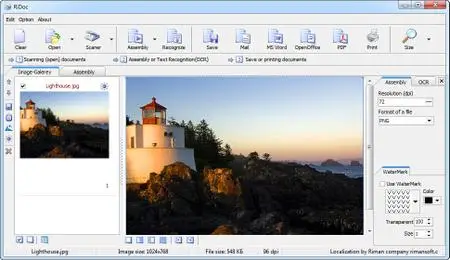
RiDoc - the program for getting images from a scanner and reduction image files sizes. The programme provides an opportunity to reduce the size of the electronic version of documents or image files without losing information quality.
Document scanning:
RiDoc is a simple tool for scanning and reducing the size of scanned documents (up to 80%) without compromising on image quality.
RiDoc lets you scan to a PDF, JPEG, BMP, PNG or TIFF file and supports multi-page PDF and TIFF documents. It can also export a scan into an MS Word document.
Emailing documents scanned by RiDoc is fast and cost-efficient thanks to the compact size of files produced by the program.
RiDoc supports automatic document feeding (ADF), so you can scan several documents automatically, then process them in a single batch.
Text recognition (OCR):
RiDoc allows you to convert scanned documents into editable text. A tool like this should always be within reach when you need to turn a simple document into an editable text file on your computer.
To recognize text from a document, you can scan a new one or open an existing image file (BMP, PNG, JPEG or multi-page TIFF).
RiDoc uses the Tesseract OCR engine, a free product currently supporting a huge number of languages.
Creation of document copies:
RiDoc will create a copy of your document and print it the necessary number of times. Prior to sending a document to print, RiDoc enables you to adjust its brightness and contrast. Sometimes, the brightness/contrast ratio of a scanned document is not perfect, which results in the poor readability of the scan, hardly discernible signatures, stamps and other elements. This can potentially lead to the loss of important information and difficulty in verifying the authenticity of a document copy. The same issues are characteristic of copiers, so users are forced to make extra copies, thus wasting lots of paper...
RiDoc doesn't have this problem - you only send a scan to print after you've made sure it has the necessary quality.
Watermarking:
Use the watermarking feature to protect your documents. You can select a style, color, opacity and size for your watermarks.
Creating document archives:
The easiest method of organizing your documents is to sort them into folders according to certain selection criteria. Searching for and opening the necessary folder can be a tedious and tiring process...
The "Quick Folders" feature is a convenient tool for the quick saving of documents to the necessary folders. First, create a list of folders your documents will be saved to. When saving a document, make a single click on the name of the necessary folder in the "Quick Folders" list - and your document will be saved right away.
Operating System:Windows 7, 8/8.1, 10, 11
Home Page -http://getridoc.com/Rapidgatorhttps://rapidgator.net/file/52303485f63656a6769f6c81bce87786/o6iph.RiDoc.5.0.14.27.Portable.rar.html
https://rapidgator.net/file/b0400714dd24ac5b48d9ee0060377d90/o6iph.RiDoc.5.0.14.27.rar.html
https://ddownload.com/38nmm2uoh9ng/o6iph.RiDoc.5.0.14.27.Portable.rar
https://ddownload.com/up50xubabb6p/o6iph.RiDoc.5.0.14.27.rar
https://nitroflare.com/view/497A7AA77462216/o6iph.RiDoc.5.0.14.27.Portable.rar
https://nitroflare.com/view/56A0C527C6BEA97/o6iph.RiDoc.5.0.14.27.rar

 Cantinho Satkeys
