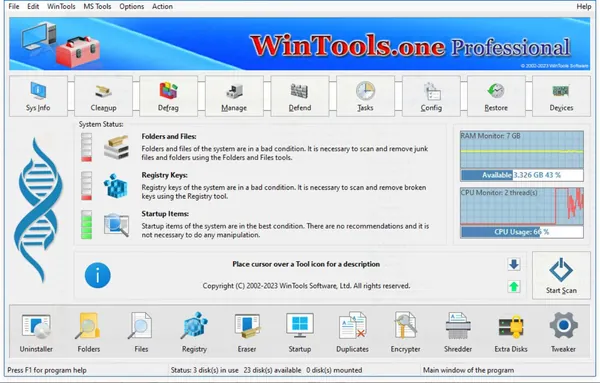
 WinTools.one Home / Professional 26.7.1 Multilingual Fast Links | 8.9 MbWinTools.one
 is a Windows system management and optimization suite designed for both everyday users and advanced users who need greater control over their operating system. The software provides tools for improving system performance, maintaining Windows stability, managing installed applications, cleaning unnecessary data, and customizing various system settings.
The application combines multiple maintenance utilities into a single interface, helping users analyze and manage different areas of their computer. It includes features for removing unwanted files, correcting system issues, controlling startup programs, protecting confidential information, and working with virtual disks.
WinTools.one is available in Home and Professional editions. The Professional edition expands the functionality of the Home version by adding additional tools for duplicate file management and providing extended options within the System Tweaker module.
- Remove unwanted applications and monitor software-related system changes.
- Scan folders and files to identify unnecessary data and optimize storage usage.
- Clean invalid shortcuts and outdated registry entries.
- Manage Windows startup programs and control automatically launched applications.
- Find duplicate files with Professional edition features.
- Secure confidential files using encryption tools.
- Permanently remove files with the file shredding utility.
- Create and manage virtual disks, including encrypted virtual disks.
- Apply Windows customization options and system fixes through System Tweaker.
- Manage additional system utilities for maintaining Windows performance.
Why Choose WinTools.one:WinTools.one provides a collection of Windows maintenance and configuration tools in one application. It is suitable for users who want to manage system cleanup, improve organization of files, adjust Windows settings, and maintain control over installed software.
The software is designed for modern Windows environments and provides separate utilities for system optimization, privacy protection, file management, and advanced configuration tasks.
System Requirements:Operating system: MS Windows 11/10/8.1/8/7/VISTA x86 x64
Minimum screen resolution: 1024x768
FAQ:Q: What is WinTools.one used for?A: WinTools.one is used for Windows optimization, system maintenance, file management, privacy protection, and operating system customization.
Q: What is the difference between Home and Professional editions?A: The Professional edition includes additional duplicate file management features and expanded System Tweaker options.
Q: Does WinTools.one support 64-bit Windows systems?A: Yes. The software supports both x86 and x64 versions of supported Windows operating systems.
Q: Can WinTools.one protect private files?A: Yes. The software includes encryption and secure file deletion tools for protecting confidential information.
Q: Is WinTools.one designed for modern Windows versions?A: Yes. WinTools.one is optimized for current Windows systems and does not support older platforms such as Windows XP and Me.
Home Pagehttps://wintools.one/wintoolsone/
Product Information:- Software Name: WinTools.one
- Version: 26.7.1
- Architecture: x86 x64
- Languages: Multilingual
- License type: Full Version
- File Size: 8.9 Mb
Recommend Download Link Hight Speed | Please Say Thanks Keep Topic Live
Links are Interchangeable - No Password - Single Extraction

 Cantinho Satkeys
