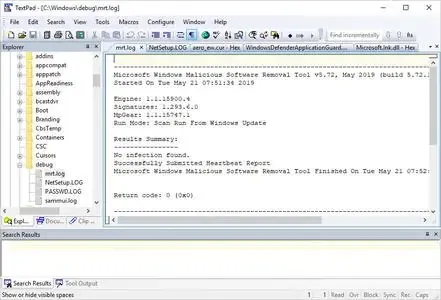
 TextPad 9.9.6 (x64) Multilingual Fast Links | 16 Mb
When just getting the job done is work enough, the last thing you need is to waste time having to learn yet another computer application. Your experience with other tools should be relevant to each new application, making it possible to sit down and use that new application right away. That's why TextPad® is so popular. Whether you simply need a powerful replacement for Notepad, a tool for editing your web pages, or a programming IDE, TextPad does what you want, the way you would expect.
Features:
Huge files can be edited, up to the limits of virtual memory.
Supports Universal Naming Convention (UNC) style names, and long ✅
File Names with spaces.
Dutch, English, French, German, Italian, Korean, Japanese, Polish, Portuguese and Spanish user interfaces.
International language support with Unicode compliance.
A spell checker using the dictionaries installed by Windows.
Multiple files can be simultaneously edited, with up to 2 views per file.
Workspaces let you restart exactly where you left off.
Document classes enable you to set defaults for preferences such as fonts, tab stops, syntax colors and character encoding, based on ✅
File Name extensions.
In addition to the usual cut, copy and paste capabilities, selected text can be case shifted and block indented, and characters, words and lines can be transposed. Cut and copied text can be appended to the clipboard, as well as replacing its contents.
Text can be automatically word-wrapped at the margin, or at a specified column, if it does not fit on a line. In this mode, text can be split into separate lines where wrapping occurs, or lines can be intelligently joined, preserving paragraphs.
Drag and drop editing for copying and moving text between documents.
Unlimited undo/redo capability. The undo buffer can be optionally cleared when a file is saved, or by using the Mark Clean command.
Block (column) selection mode, and visible display of tabs and spaces.
A keystroke macro recorder, with up to 16 active macros.
Sorting, using up to 3 keys.
Text can be automatically aligned and indented, relative to the previous line, to aid block indentation.
The right mouse button pops up an in-context menu.
The cursor can be constrained to the text, or can be positioned freely in the document view.
Toolbar with fly-by usage hints, and an active status bar.
A powerful search/replace engine using Perl-style regular expressions. Sets of files in a directory tree can be searched, and text can be replaced in all open documents at once.
Incremental search toolbar for literal text.
Visible bookmarks can be placed on individual lines, and on all occurrences of a search pattern. Bookmarked lines can be cut, copied or deleted.
Built in file comparison utility, and up to 16 user-defined tools with argument macros.
A built in file manager for fast file copying, renaming, deleting etc.
Print previewing, and printing with customizable headers/footers and page breaks.
Viewer for binary files using a hexadecimal display format.
Hypertext links from file search and user tool output to the relevant source line.
The editor detects when an open file has been modified by another tool, and prompts you to reopen it.
Scripts in languages such as Python, PHP and awk can be configured to filter the selected text in a document.
Minimum Requirements:TextPad 9 runs on the Intel/AMD and ARM 64-bit editions of Windows 10 and 11, and on Server 2016 to 2022.
Home Page -
https://www.textpad.com/Recommend Download Link Hight Speed | Please Say Thanks Keep Topic Live
Links are Interchangeable - No Password - Single Extraction

 Cantinho Satkeys
