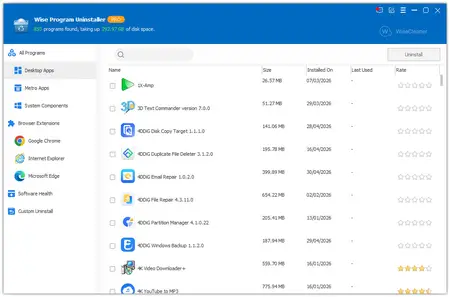
 Free Download Wise Program Uninstaller Pro 3.2.9.275 Multilingual Fast Links | 11.9 Mb
Wise Program Uninstaller is the ideal solution for removing unwanted programs from your Windows PC. With its simple, user-friendly interface, you can quickly and thoroughly uninstall any application. Its advanced scan engine finds and deletes leftover files, folders, and registry entries after uninstallation, ensuring the program is fully removed from your computer.
Force Uninstall - Remove Stubborn Programs
Some problematic software - whether due to corrupted installers or malware-like persistence - simply won't uninstall normally. That's where Wise Program Uninstaller's Force Uninstall feature shines. It performs a deep system scan to locate every associated file, folder, and registry entry, then completely erases all traces of the unwanted program - as if it was never installed on your PC.
Custom Uninstall - Delete Hidden & Unlisted Programs
Some applications don't appear in your system's installed programs list (Control Panel > Programs and Features or Windows Settings > Apps), making them impossible to remove through normal methods. Wise Program Uninstaller solves this problem with its powerful Custom Uninstall feature. Simply locate the program's installation folder, and our tool will automatically find and completely remove all associated files, folders, and registry entries - giving you a clean uninstall of even the most elusive programs.
Software Health - Clean, Secure & Optimize Your Programs
Software Health scans, cleans, and optimizes your installed and previously removed applications. With a single click, it removes leftover registry entries and files, clears temporary files and privacy traces created during app runtime, and lets you manage app permissions (startup apps, scheduled tasks, context menu entries, and services), and identifies apps and websites that push notifications or pop-ups - keeping programs cleaner, faster, and more private.
Boost Browser Performance with Batch Extension Removal
Tired of sluggish browsers? Many users don't realize how much unused extensions slow down their browsing experience. Wise Program Uninstaller's batch removal feature lets you:
Clean up multiple toolbars, plugins, and add-ons (including BHOs) at once.
Work across all major browsers: Chrome, Firefox, Edge, and Internet Explorer.
Reclaim system resources and accelerate browser startup.
Remove potentially unwanted extensions that may track your activity.
Tip: For best results, disable or turn off browser sync before uninstalling extensions to prevent them from automatically reinstalling.
One-Click Uninstalls with Context Menu
Save time and streamline your software management with Wise Program Uninstaller's context menu option. Simply right-click any application shortcut on your desktop and select "Uninstall with Wise Program Uninstaller" for instant removal - no need to hunt through settings or control panels.
Home Page -
https://www.wisecleaner.com/wise-program-uninstaller.htmlRecommend Download Link Hight Speed | Please Say Thanks Keep Topic Live
Links are Interchangeable - No Password - Single Extraction

 Cantinho Satkeys
