 TransFlash TF Format Tool 3.2 | Size: 678.98 KB
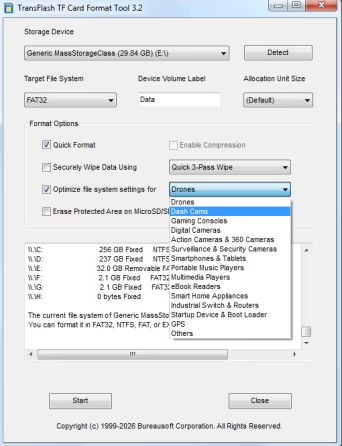
Language: EnglishA TF card (TransFlash card) is a compact, high-density, removeable flash memory card measuring 15x11x1mm used in small electronics such as portable devices. The software formats all types of TF memory cards and optimizes file systems according to use cases, such as for drones, gaming consoles, dash cams, cameras, security, surveillance, smartphones, tablets, portable music players, video players, ebook readers, GPS navigation systems, startup devices, boot loader, industrial switch, routers, and home appliances, in a safe way that replaces Windows Format operations. The software reduces data corruption and enables faster access to the cards.
TF cards are classified by capacity into four main types: Secure Digital (up to 2GB), Secure Digital High Capacity (2GB-2GB), Secure Digital Extended Capacity (32GB-TB), and Secure Digital Ultra Capacity (2TB-128TB). SDHC uses FAT32, while SDXC/SDUC utilize exFAT for high-speed data access. Choosing depends on device compatibility and storage needs (e.g., 4K video requires SDXC/SDUC). Some dash cams require FAT32 for TF cards. Unfortunately, the largest FAT32 volume that Windows can create is 32GB for most TF cards and TransFlash cards. The volume is too big for FAT32is the common error message reported by Windows. This software is created to solve the problem. TF cards speed classes defining usage, Class 10/U1 for High-definition video, V30/U3 for 4K video, and A2 for fast app loading. The software optmizes file systems on TF cards depending on the use cases.
The software provides quick and easy access to the full capabilities of your TF memory cards. The software is designed specifically for memory cards of different capacities and speed classes. It is strongly recommended to use the TransFlash TF Format Tool software instead of formatting utilities provided with operating systems that format various types of storage media. Using generic formatting utilities may result in less than optimal performance for your TF cards, and on certain devices, they may result in data corruption.
All TF memory cards have a Protected Area on the card for the Secure Digital standard's security function. The security function in the protected area of an TF card, known as CPRM (Content Protection for Recordable Media), is a hardware-based security layer designed to prevent unauthorized copying of copyrighted, high-value data, such as paid media or proprietary, highly sensitive corporate information, by using mutual authentication. TransFlash TF Format Tool software does not format the "Protected Area" by default, unless you choose the option to erase the protected area with the software.
Key Aspects of the Protected Area Security Function
CPRM (Content Protection for Recordable Media) - This is the core technology where cryptographic keys are stored. It acts as a digital seal that prevents unauthorized duplication.
Mutual Authentication - TF card validates the host device, and the device validates the card before accessing the protected area.
Revocation Feature - This can prevent specific compromised host devices from accessing the data.
Hardware-Based Isolation - Data in this area is physically hidden from standard file systems (e.g., Windows Explorer).
DRM (Digital Rights Management) - Used in secure distribution of digital content, protecting DRM-protected video/audio, and storing security keys for embedded systems. Content Protection for Pre-recorded Media (CPPM), Secure Digital Copyright Protection, and sometimes simply "Hardware Encryption" or "Protected Area" or "Digital Rights Management (DRM) Area".
TF Card Capacity Types
SD (Standard) - Up to 2GB, supports older devices.
SDHC (High Capacity) - >2GB to 32GB, compatible with SDHC/SDXC devices.
SDXC (Extended Capacity) - >32GB to 2TB, ideal for 4K video.
SDUC (Ultra Capacity) - >2TB to 128TB.
SD Express: A newer standard offering speeds comparable to SSDs, available on some SDXC and SDUC cards.
Speed Classes
Class 10, U1, A1 - Cameras, phones, and tablets.
V30, V60, U3 - High - Speed/4K Video such as action cameras, drones, 4K recording.
A2, U3, V30, V60, V90 - Gaming consoles, 8K recording, high-res cameras, pads, and computers.
Key Differences
Size - TF cards (TransFlash) and SD cards differ primarily in physical size and intended use, though they are functionally similar. TF cards are tiny (15mm x 11mm x 1mm), while standard SD cards are larger (32mm x 24mm x 2.1mm). TF cards are used in mobile devices, while SD cards serve cameras and laptops, with adapter compatibility available.
Interchangeability - TF cards can be used in SD card slots using an SD adapter. However, a standard SD card cannot fit into a device designed for a TF card.
Usage Context - TF cards are widely used in compact devices like smartphones, drones, and action cameras. SD cards are common in devices with more space, such as digital cameras, camcorders, and laptops.
Security Lock - Many standard SD cards have a physical write-protection switch (lock switch) on the side to prevent data from being deleted or modified. TF cards lack this physical switch.
Development and Branding - TransFlash was the original name for the TF tiny cards developed by SanDisk and Motorola in 2004. It was later adopted by the SD Association and rebranded as MicroSD.
Speed Classes - Cards are rated (Class 10, U1, U3, V30, V60, V90) to indicate minimum write speeds, essential for recording high-resolution video.
Compatibility
TransFlash TF Card Format Tool software formats any TF cards and TransFlash cards in a split second. The software has been tested with more than 20 TransFlash/TF memory cards brands, such as SanDisk, Samsung, Kingston, Lexar, Transcend, Toshiba, Kioxia, Western Digital, Lenovo, Fujitsu, Dell, HP, Sony, ADATA, Apacer, ASUS, Corsair, Crucial, HGST, Imation, Micron, OCZ, and PNY.
System Requirements
Windows 11
Windows 10
Windows 8.1
Windows 8
Windows 7
Windows Vista
Windows XP
Windows 2000
Windows Server 2025/2022/2019/2016/2012/2008/2003/2000
What's new
Support quick format for TF and TransFlash cards larger than 1TB.
Protect Protected Area from damage.
DOWNLOAD LINKS:https://rapidgator.net/file/a5565709fe969c1fecafe27b36914768/TransFlash_TF_Format_Tool_3.2.exe.html
https://nitroflare.com/view/385597EF5906B4F/TransFlash_TF_Format_Tool_3.2.exe

 Cantinho Satkeys
