* Cantinho Satkeys

Refresh History
  • cereal killa: try65hytr pessoal  r4v8p 4tj97u<z
    08 de Julho de 2026, 22:21
  • JP: dgtgtr Pessoal 4tj97u<z 2dgh8i k7y8j0 r4v8p
    07 de Julho de 2026, 18:29
  • j.s.: tenham um bom domingo  4tj97u<z
    05 de Julho de 2026, 09:39
  • j.s.: ghyt74 a todos  49E09B4F
    05 de Julho de 2026, 09:38
  • JP: try65hytr Pessoal  4tj97u<z 2dgh8i k7y8j0 r4v8p xe4s
    03 de Julho de 2026, 04:43
  • cereal killa: try65hytr pessoal,esta calor do karago  r4v8p 43e5r6
    01 de Julho de 2026, 22:01
  • j.s.: try65hytr a todos  49E09B4F
    30 de Junho de 2026, 21:02
  • JP: try65hytr Pessoal  4tj97u<z  2dgh8i k7y8j0 r4v8p
    30 de Junho de 2026, 05:31
  • JP: try65hytr Pessoal  4tj97u<z 2dgh8i k7y8j0 classic
    26 de Junho de 2026, 05:05
  • cereal killa: ghyt74 e continuaçao bom sao joao  wwd46l0'
    24 de Junho de 2026, 12:16
  • JP: try65hytr Pessoal  4tj97u<z 2dgh8i k7y8j0 xe4s
    24 de Junho de 2026, 04:05
  • FELISCUNHA: ghyt74   4tj97u<z e bom São João  h7i37
    23 de Junho de 2026, 10:55
  • j.s.: dgtgtr a todos  49E09B4F
    20 de Junho de 2026, 15:51
  • FELISCUNHA: ghyt74   49E09B4F  e bom fim de semana  4tj97u<z
    20 de Junho de 2026, 11:31
  • JP: try65hytr Pessoal  4tj97u<z 2dgh8i k7y8j0
    19 de Junho de 2026, 04:41
  • romi: Beleza
    19 de Junho de 2026, 04:28
  • cereal killa: try65hytr pessoal  2dgh8i
    18 de Junho de 2026, 23:28
  • JP: dgtgtr Pessoal  2dgh8i k7y8j0 r4v8p
    18 de Junho de 2026, 19:48
  • joaozinho_bosco: boas tardes.......há quanto tempo
    18 de Junho de 2026, 14:35
  • j.s.: dgtgtr a todos  49E09B4F
    16 de Junho de 2026, 18:24

Autor Tópico: KeyCtrl Professional 2.200 Multilingual  (Lida 108 vezes)

0 Membros e 1 Visitante estão a ver este tópico.

Offline mitsumi

  • Sub-Administrador
  • ****
  • Mensagens: 134391
  • Karma: +0/-0
KeyCtrl Professional 2.200 Multilingual
« em: 29 de Abril de 2026, 07:22 »


KeyCtrl Professional 2.200 Multilingual | Size: 7.94 MB
Language: English


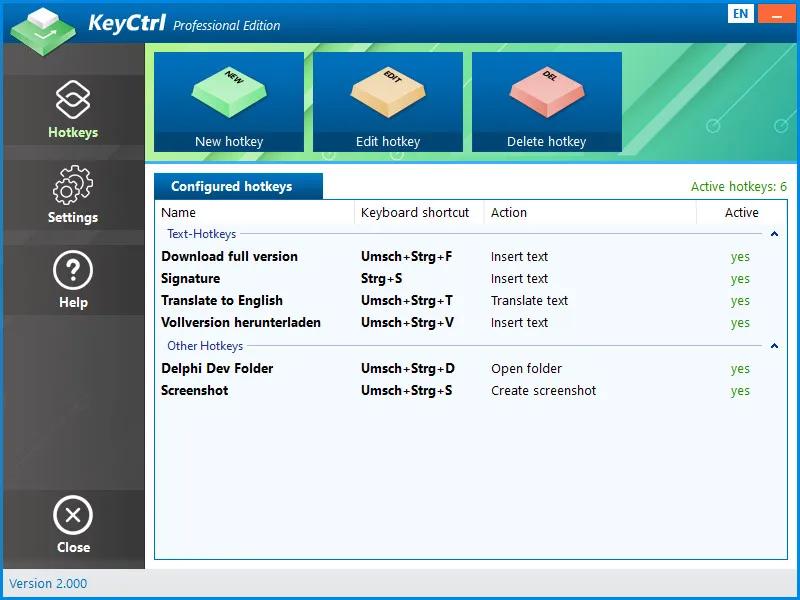
Hotkey Manager KeyCtrl: Keyboard shortcuts for all tasks. Ctrl+C and Ctrl+V are the most used keyboard shortcuts on Windows. They save the user a lot of time and speed up working on the PC immensely.

Wouldn't it be nice if you could use keyboard shortcuts for other tasks as well? For example, for the automatic insertion of frequently used texts in the e-mail program or in Word, to translate website content, to take screenshots or to open the most used folder in Windows Explorer? KeyCtrl is the key!

The right key combination and the defined task solve themselves as if by magic. Despite its ease of use, KeyCtrl also offers professional options. In this way, certain hotkeys can only be started when a specific window is displayed or a specified process is running. is loaded.

Automate your daily tasks now and define your own hotkeys. Increase productivity and minimize time spent with the right shortcuts!

Supported Operating Systems:
Windows 11
Windows 10 (32-bit & 64-bit)
Windows 8.1 (32-bit & 64-bit)
Windows 8 (32-bit & 64-bit)
Windows 7 (32-bit & 64-bit)
Windows Server 2022
Windows Server 2016/2019 (32-bit & 64-bit)
Windows Server 2012 (32-bit & 64-bit)

HOMEPAGE:
Código: [Seleccione]
https://www.ascompsoftware.com/en/products/keyctrl/tab/description


DOWNLOAD LINKS:


Citar
https://rapidgator.net/file/e7ba2c6a7077cc4e3b8a1c25fdf96e0a/KeyCtrl_Professional_2.200_Multilingual.rar.html

Citar
https://nitroflare.com/view/755040868665DC6/KeyCtrl_Professional_2.200_Multilingual.rar
