 Minimeters 1.0.29.251 (win/macos/linux)
File size: 231.6 MB
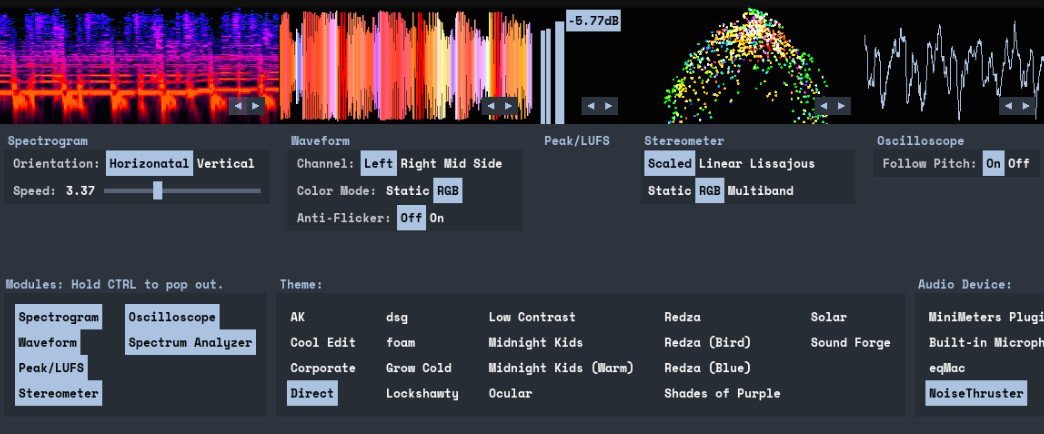
MiniMeters is a simple audio metering Application & Plug-In suite for Windows, macOS, and Linux. In the Standalone app, monitor any stereo Input, Output*, or use the included Audio Server plug-in to send audio into the MiniMeters app. New in v1.0: MiniMeters now includes plug-in versions of each meter and the new Quad Layout. Customize the layout of meters in a Horizontal bar, pop out meters to create a custom layout, or swap to the new Quad Layout for a simple display to cover most needs.
Features7 modules to choose from to build your perfect metering setup: Spectrogram, Waveform, Loudness, Stereometer, Oscilloscope, VU, and Spectrum.
Arrange each module in any order in a Horizontal bar, pop them out to separate windows to create a custom layout.
Capture your default audio device on Windows, macOS 14.2+, or Linux.
Use the Audio Server plug-in to send audio to MiniMeters directly from your DAW or plug-in host.
Clip the last 10 or 60 seconds of audio received by MiniMeters or start a recording and capture audio from your whole system.
Dive deep and create your own color scheme to set the mood.
No copy protection, just download and install.
Includes VST3 / Audio Unit / CLAP Plug-InsMiniMeters: Standalone
Audio Server (Formally MiniMetersServer) Plug-In: For sending audio from a DAW or host to the MiniMeters Standalone Application
Oscilloscope Plug-In
Spectrogram Plug-In
Spectrum Plug-In
Stereometer Plug-In
VU Plug-In
Waveform Plug-In
ModulesSpectrogram
Analyze the frequency content of your audio over time.
Choose between Horizontal or Vertical display.
Waveform *Available In Demo*
Analyze the Volume of your audio over time.
Select "Multi-Band" to see a DJ-style colored Waveform.
Adjust the speed of the Waveform.
Compare the volume of the Low, Mid, and High frequencies using the "History" setting.
Peak/LUFS *Available In Demo*
View the immediate Peak and LUFS volume in this simple Module.
Stereometer
Analyze the stereo width and balance with 3 modes
"Scaled" zooms in on the lower volume audio to show detail you might be missing.
"Linear" shows a unipolar view of your audio.
"Lissajous" shows an unadulterated Lissajous function.
Switch the color to "RGB " or "Multi-band" to see stereo width and frequency content at the same time.
Oscilloscope
See a detailed waveform view of your audio immediately. With "Pitch Tracking" mode you can easily see the shape of your waveform.
Spectrum Analyzer
View the frequency content of your audio in "Left/Right" or "Mid/Side" mode.
"Frequency Readout" shows the loudest frequency in your audio. Great for finding that note or tricking your friends into thinking you have perfect pitch.
Adjust the "Slope" to create a flat target to reference your mix against.
...and more
https://rapidgator.net/file/6838268427ce97b5b4ebd02893daea63/MiniMeters1..zip.html
https://nitroflare.com/view/ED8E9B103988193/MiniMeters1..zip

 Cantinho Satkeys
