 Free Download FormulaDesk FormulaSpy 1.39 | 5.9 Mb
Excel add-in that makes Excel formulas easy to understand, check, troubleshoot and fix.
X-ray for Excel formulas
Instantly understand and troubleshoot complex Excel formulas
SEE FORMULA STEPS AND CALCULATIONS
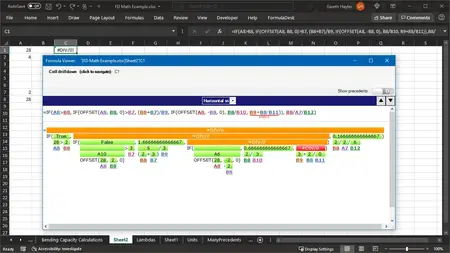
The horizontal view displays the result of each part of a formula in order to see how the result is calculated. You can also expand and collapse the formula parts by clicking the green result bar.
The vertical view displays a formula as a tree of the parts of a formula. The parts can be expanded and collapsed.
PINPOINT ERRORS INSTANTLY
Excel tells you when a formula has an error, but that's it. Long formulas are even worse...where do you even start to track down the problem?
Now, FormulaSpy will pinpoint EXACTLY where the error is - no more guessing or wasting hours of your precious time.
DRILLDOWN INTO REFERENCED CELLS (PRECEDENTS)
Explore the cells that the formula uses, visit them and see their formulas, then drill into their references to gain a deep understanding of the entire calculation chain.
Modern formula editor
Live editor with instant feedback.
INSTANT FORMATTING
Format the formula at any time by clicking the 'Format'' button. This will auto-indent the formula to make it easier to read.
GOOD / BAD INDICATOR
As you edit the formula, the border will turn green or red to indicate whether the formula is valid or not, making it very easy to check your formula for completeness.
Focus child (nested) formula
Click the 'Focus' button to syntax highlight only the formula that contains the cursor - color all other parts of the formula a light gray. This makes it easier to see which part of a fromula you're working on.
Check compliance of styles and formatting
Style Explorer shows exactly what styles are being used (and abused) and where they are hiding.
STYLE MAP - SEE WHERE STYLES ARE USED
The Style Map visually shows where a style is being used, so that you can easily look at the pattern to decide if anything is wrong or unexpected.
VIEW STYLES
Styles are listed as well as all of their variations, where the style has been applied but the formatting has been altered slightly afterwards, so the cell is no longer using a 'pure' version of the style.
DETAILS OF A STYLE
When you click on a style or one of its variants then Style Explorer will list the cells that are using it. Clicking on a style, or one the cells that are using it, will select the range in Excel.
Define allowed styles
Select cells that contain the styles you want, then find all instances other other styles - the ones you don't want. Alternatively, select some cells that contain styles that you want to find, then find all instances of these selected styles anywhere in your workbook.
Create custom functions (Lambda) from existing formulas (point-and-click)
Lambda functions allow you to create new functions without VBA. Now, FormulaSpy enables you to create these new custom functions by using your existing formulas as templates.
Point and click
Convert an existing formula into a custom function by clicking on the parts that you want to convert into variables.
Rewrite existing formulas
Find and rewrite and rewrite and update formulas that can be enhanced to use the new custom function....with just a few clicks.
Recommend Download Link Hight Speed | Please Say Thanks Keep Topic Live
Links are Interchangeable - No Password - Single Extraction

 Cantinho Satkeys
