 Free Download Yanbo downloadMusic 1.0.0 (x64) | 47 Mb
downloadMusic is a powerful Mp3 music download tool that supports searching and downloading vast amounts of Mp3 music files from music websites. The software provides a bilingual interface (English/Chinese) and is simple and convenient to operate.
Interface Introduction
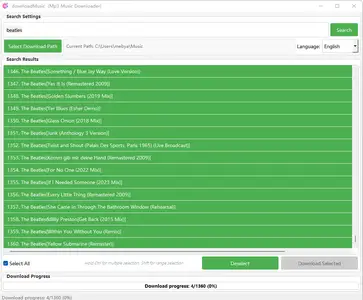
Main Interface Areas
1. Search Settings Area - Search Box: Enter song title or artist name. - Search Button: Initiate the search. - Path Selection: Set the download save location. - Language Selection: Switch between English and Chinese interfaces.
2. Search Results Area - Displays the list of found music. - Supports multi-select operations (Ctrl/Shift keys).
3. Control Buttons Area - Select All / Deselect - Download Selected Songs.
4. Download Progress Area - Shows the current download progress. - Displays the number of files and completion percentage.
Steps for Use
Step 1: Search for Music
1. Enter the song title or artist name in the search box.
2. Click the "Search" button.
3. Wait for the search results to appear in the list.
Step 2: Select Music
1. In the search results list, select the songs you want to download.
- Single Select: Click directly on a song.
- Multi-Select: Hold the Ctrl key and click on multiple songs.
- Range Select: Hold the Shift key to select a continuous range.
2. You can click "Select All" to choose all songs.
3. Click "Deselect" to clear all selections.
Step 3: Set Download Path
1. Click the "Choose Download Path" button.
2. In the pop-up dialog, select the save location.
3. The default path is the user's "Music" folder.
Step 4: Start Downloading
1. After selecting the songs, click the "Download Selected" button.
2. Monitor the progress bar showing the download status.
3. Wait for the download completion prompt.
Features
1. Multi-Language Support
- Displays the English interface by default.
- Can be switched to the Chinese interface at any time.
- All buttons, labels, and prompts support both languages.
2. Smart Download
- Supports resuming interrupted downloads.
- Avoids duplicate downloads (automatically renames identical files).
- Displays ✅
File Size and download progress.
3. Batch Operations
- Supports batch selection and simultaneous multi-file downloads.
- Intelligently manages the download queue.
- (Note: Original Chinese content ends here. Translation continues from previous point.)
- Facilitates managing a large number of downloads efficiently.
Home Page-
https://apps.microsoft.com/detail/9nwp5xc8d1rvRecommend Download Link Hight Speed | Please Say Thanks Keep Topic Live
Links are Interchangeable - No Password - Single Extraction

 Cantinho Satkeys
