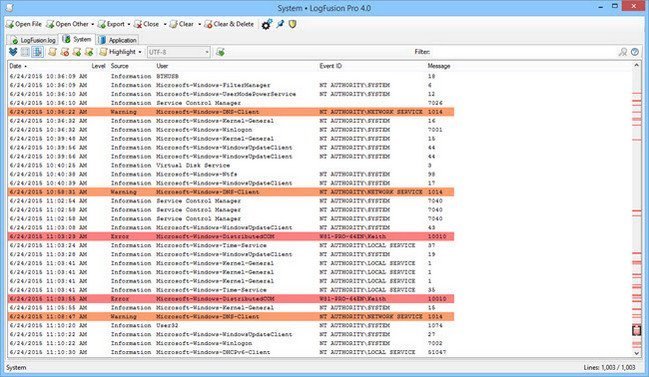
 LogFusion Pro 7.1
File Size: 24.2 MB LogFusion is a powerful log monitoring tool that makes parsing your logs easy. Take advantage of LogFusion's Row Highlighting and Text Filtering features to quickly filter your log and only show the relevant lines you are looking for. Use the Custom Columns feature to let LogFusion parse and split your logs into separate columns for easier reading. Just like the popular 'tail' program in Linux/Unix, LogFusion can also auto-scroll and always show you the newest lines in your log files in real-time.
Features
Row Highlighting
Use LogFusion's powerful custom highlighting to match text strings or regex patterns and format the matched log lines to suit your needs.
Advanced Text Filtering
Use LogFusion's Advanced Text Filtering to filter and hide lines that don't match your search text, all in real-time as new lines are being added. Complex queries allow you to easily narrow down your results.
Watched Folders
LogFusion can automatically add new logs from Watched Folders. Just specify the folders to monitor, and LogFusion will automatically open any new log files created in those folders.
Custom Columns
Create custom column definitions and let LogFusion parse and split the log lines into your custom columns for easier reading.
Sync Highlight Rules
LogFusion Pro can sync your highlighting rules online, allowing them to be easily loaded and updated from any computer where you are logged in.
Auto-Scroll (like 'tail')
Just like the 'tail' program on Linux/Unix, you can use LogFusion to show the newest lines in a log in real-time.
Supports Many Log Types
LogFusion can read any text log files, like server logs or application debug logs. You can also view local and remote Windows Event Logs and Event Channels, and even capture text from OutputDebugString function calls for easy application debugging.
Tabbed Interface
LogFusion uses an intuitive and familiar tabbed interface, while still allowing you to undock logs from the main window into separate windows for side-by-side comparison of related logs.
Scrollbar Highlight Markings
LogFusion's scrollbar shows indicators for highlighted lines in the log file, making it easier to locate lines that match your highlight rules, especially in large log files.
Elevation for Secure Logs
Some logs need Administrator privileges, so just use LogFusion's 'Elevate to Administrator' button to quickly and easily elevate LogFusion.
Pin LogFusion Always On Top
Pin LogFusion's window on top of all other windows using the 'Always on Top' button so you can always see your logs, no matter what you're doing.
HOMEPAGEhttps://www.logfusion.ca/
DOWNLOAD https://rapidgator.net/file/49d48de62a30339b4f941b3f7c973660/LogFusion.7..rar.html
https://nitroflare.com/view/DA6FB1461616CFA/LogFusion.7..rar

 Cantinho Satkeys
