Microsoft Copilot & Outlook
Published 10/2025
Created by Omar Koryakin
MP4 | Video: h264, 1280x720 | Audio: AAC, 44.1 KHz, 2 Ch
Level: All | Genre: eLearning | Language: English + subtitles | Duration: 28 Lectures ( 1h 23m) | Size: 722 MB
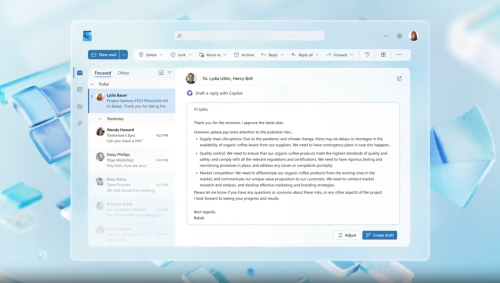
Work faster in Outlook with Copilot draft emails, summarize threads, prioritize inbox, schedule better. Includes quizzesWhat you'll learnDraft, refine, and personalize Outlook emails fast with Copilot.\nSummarize long threads, pull action items, and cite source references.\nUse effective prompt patterns to control tone, length, and style.\nCreate PowerPoint decks from a prompt or a reference document.\nOrganize and polish slides: add images, adjust layout, and review with Copilot.\nSpeed up Excel work: generate formulas, convert, sort, and analyze data.\nPrioritize inbox, schedule meetings, and send clear follow-ups with Copilot.\nUse Copilot in Teams to summarize chats/meetings and propose next steps.
RequirementsA Microsoft 365 work or school account with Copilot access (or demo access).\nBasic Outlook familiarity (email, calendar).\nOptional: Excel and PowerPoint installed.\nNo AI experience needed; we use simple prompts and examples.\nBest with files saved to OneDrive/SharePoint/Teams.
DescriptionMicrosoft Copilot & Outlook shows you how to save time and improve clarity in everyday email and calendar work. Using simple prompts, you'll learn how Copilot helps you draft and refine emails, summarize long conversations with source references, prioritize your inbox, and set up meetings with clear agendas and follow-ups. We also cover how Copilot connects to your Microsoft 365 work content like your calendar and documents to bring the right context into Outlook, while still respecting your organization's permissions and policies.The course is hands-on and practical. Each section ends with a short quiz so teams can confirm understanding and managers can track progress. You'll see repeatable prompt patterns for tone, length, and structure; tips to reduce noise and handle triage; and quick workflows to turn threads into decisions and action items. We include scenarios for customer updates, stakeholder alignment, and post-meeting recaps, plus time-saving routines you can use every day.No AI background is required. If you can use Outlook, you can use Copilot. The lessons use simple English and short demos, with subtitles available in multiple languages. By the end, you'll be able to produce clear, professional messages faster; prepare meetings with better context; follow up with confidence; and measure the time you save making Copilot a daily habit that benefits both you and your organization.Key outcomes:• Draft and refine emails with Copilot• Summarize threads and extract action items with references• Prioritize your inbox and streamline scheduling• Use safe, review-first practices across Microsoft 365
Who this course is forOffice professionals, team leads, executive assistants, project coordinators, sales/CS, and anyone new to Copilot who wants faster email, better summaries, clearer slides, and quicker Excel tasks.\nGreat for managers and L&D teams who want measurable skills with section quizzes.
DOWNLOAD
https://rapidgator.net/file/336aeec15cae835d15f8897e11c36e00/Microsoft_Copilot_&_Outlook.rar.html
https://ddownload.com/w78tord4cglq/Microsoft_Copilot_%2526_Outlook.rar

 Cantinho Satkeys
