VMware Workstation Pro 17.5.1.23298084 (x64)
Medizin inklusive/Crack
Medicine included/crack
Size: 594 MB
format:Rar/exe/iso/dmg
Languages: English
Compatibility: Windows 10, 11 [64-bits]
VMware Workstation Pro is the industry standard for running multiple operating systems as virtual machines (VMs) on a single Linux or Windows PC. IT professionals, developers and businesses who build, test or demo software for any device, platform or cloud rely on Workstation Pro. Workstation Pro Delivers a Data Center in Your Laptop.
Features
Sphere Connectivity
Use Workstation Pro to connect to vSphere, ESXi or other Workstation Pro servers. Drive remote Linux or Windows VMs (and others), command power operations, or transfer VMs to and from vSphere environments. A common VMware hypervisor enables simple portability.
Clones for Rapid Duplication
Save time and effort and ensure an exact duplicate when repeatedly creating the same VM setup. Use "Linked Clones" to quickly duplicate a VM while significantly reducing physical disk space. Use "Full Clones" to create fully isolated duplicates that can be shared with others.
Helpful Snapshots
Create a rollback point to revert to on the fly, which is perfect for testing unknown software or creating customer demos. Multiple snapshots make it easy to test a variety of different scenarios without the need to install multiple operating systems.
Powerful Virtual Networking
Create complex IPv4 or IPv6 virtual networks for VMs, or integrate with third-party software to design full data center topologies using real-world routing software and tools. New in Workstation is Network Simulation for introducing packet loss, latency and bandwidth restrictions.
High-Performance 3D Graphics
VMware Workstation Pro supports DirectX 10 and OpenGL 3.3, to deliver a fluid and responsive experience when running 3D applications. You can run the most highly demanding 3D apps like AutoCAD or SOLIDWORKS with near-native performance in a Windows VM.
High Resolution Display Support
Workstation Pro is optimized to support high-resolution 4K UHD (3840x2160) displays for desktops and QHD+ (3200x1800) displays used in laptops and x86 tablets. It also supports multiple monitors with different DPI settings, such as a new 4K UHD display along with an existing 1080p HD display.
Cross Compatibility
Create Linux or Windows VMs that can run across the VMware product portfolio or create restricted VMs for use in Horizon FLEX. We even support the open standard so you can create and play VMs from other vendors.
Monster Virtual Machines
Create massive VMs with up to 16 vCPUs, 8 TB virtual disks, and 64 GB of memory to run the most demanding desktop and server applications in a virtualized environment. Give graphics-intensive apps an additional boost by allocating up to 2GB of available host video memory to a VM.
Restricted Access to Virtual Machines
Protect corporate content by restricting access to Workstation VM settings like drag-and-drop, copy-and-paste and connections to USB devices. Virtual machines can be encrypted and password-protected to ensure only authorized users have access.
Shared Virtual Machines
Quickly share and test applications in a simulated production environment. Run VMware Workstation Pro as a server to share a repository of pre-loaded Linux and Windows VMs in every desired configuration with your teammates, department or organization.
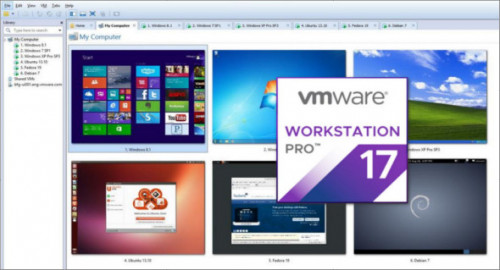
Screenshots
Download
Nitroflare / Rapidgator
all hosters are compatible - alle Hoster sind kompatibel
https://nitroflare.com/view/D6E282F512A1B16

https://rapidgator.net/file/01ac50aebc0905036faaf6de04ec4cd6

 Cantinho Satkeys
