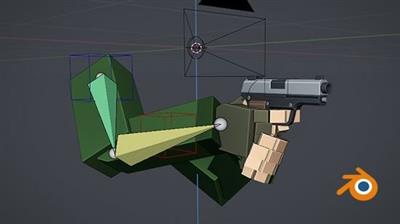
MP4 | Video: h264, 1280x720 | Audio: AAC, 44.1 KHz, 2 Ch
Genre: eLearning | Language: English + srt | Duration: 21 lectures (4h 56m) | Size: 2.94 GB
Learn how to rig and animate low poly style FPS arms from scratch using Blender 2.9
What you'll learn:Creating advanced rigs in Blender 2.9
3D Animation in Blender 2.9
Animation basics and theory
3D Rigging Basics
Basics of Blender tools and workspaces
Basic skinning methods
RequirementsPC with internet connection
Good computer skills
Previous experience working with Blender is a plus
DescriptionBlender is a powerful 3D software that allows you to create everything from 3D models, animations, rigs, and much more, it also comes included with tools for exporting content to game engines such as Unity and Unreal Engine, making it great for game development as well.
In this course you will learn how to create an advanced FPS rig from scratch, suitable for both game development and rendering. The process is thoroughly explained in this step-by-step style course, all source files are also included making it easy to follow along and see how it was made.
This course is split up into five different sections, we start off with the course introduction, we then move on to creating the rig for the gun and the arms, and then finally we will be creating the animations, such as fire, reload, walk, and more!
Here is what the course covers:
Downloading and installing Blender 2.9
Creating a rig for a low poly style 3D model
Skinning a gun model to the rig
Creating an advanced arm rig for a low poly style 3D model
Skinning a model to the arm rig
Optimizing rigs for the animation workflow
Setting up an animation workspace in Blender
Different approaches to workflows when creating animations
Using the graph editor to create polished animations
Creating FPS animations suitable for game development (such as fire, reload, walk, idle)
Along the way I will be showing some tips and tricks that I have learned, as well as explaining how the process works.
Who this course is forAspiring 3D animators
Intermediate Blender users
Blender users looking to learn 3D animation and rigging
Aspiring game developers
Download link:
Só visivel para registados e com resposta ao tópico.Only visible to registered and with a reply to the topic.Links are Interchangeable - No Password - Single Extraction

 Cantinho Satkeys
