* Cantinho Satkeys

Refresh History
  • FELISCUNHA: ghyt74  e bom fim de semana  4tj97u<z
    Hoje às 11:29
  • JP: try65hytr Pessoal  4tj97u<z 2dgh8i k7y8j0 classic
    24 de Julho de 2026, 04:53
  • j.s.: try65hytr a todos  49E09B4F
    22 de Julho de 2026, 21:03
  • JP: try65hytr Pessoal  4tj97u<z 2dgh8i k7y8j0 yu7gh8
    21 de Julho de 2026, 03:46
  • momo2free: dorcal
    19 de Julho de 2026, 18:10
  • FELISCUNHA: Votos de um santo domingo para todo o auditório  k8h9m
    19 de Julho de 2026, 10:44
  • JP: try65hytr Pessoal  4tj97u<z  2dgh8i k7y8j0
    14 de Julho de 2026, 05:28
  • j.s.: ghyt74 a todos
    13 de Julho de 2026, 08:29
  • cereal killa: try65hytr pessoal  r4v8p 4tj97u<z
    08 de Julho de 2026, 22:21
  • JP: dgtgtr Pessoal 4tj97u<z 2dgh8i k7y8j0 r4v8p
    07 de Julho de 2026, 18:29
  • j.s.: tenham um bom domingo  4tj97u<z
    05 de Julho de 2026, 09:39
  • j.s.: ghyt74 a todos  49E09B4F
    05 de Julho de 2026, 09:38
  • JP: try65hytr Pessoal  4tj97u<z 2dgh8i k7y8j0 r4v8p xe4s
    03 de Julho de 2026, 04:43
  • cereal killa: try65hytr pessoal,esta calor do karago  r4v8p 43e5r6
    01 de Julho de 2026, 22:01
  • j.s.: try65hytr a todos  49E09B4F
    30 de Junho de 2026, 21:02
  • JP: try65hytr Pessoal  4tj97u<z  2dgh8i k7y8j0 r4v8p
    30 de Junho de 2026, 05:31
  • JP: try65hytr Pessoal  4tj97u<z 2dgh8i k7y8j0 classic
    26 de Junho de 2026, 05:05
  • cereal killa: ghyt74 e continuaçao bom sao joao  wwd46l0'
    24 de Junho de 2026, 12:16
  • JP: try65hytr Pessoal  4tj97u<z 2dgh8i k7y8j0 xe4s
    24 de Junho de 2026, 04:05
  • FELISCUNHA: ghyt74   4tj97u<z e bom São João  h7i37
    23 de Junho de 2026, 10:55

Autor Tópico: Battery Mode 4.3.3 build 206  (Lida 10 vezes)

0 Membros e 1 Visitante estão a ver este tópico.

Offline mitsumi

  • Sub-Administrador
  • ****
  • Mensagens: 134752
  • Karma: +0/-0
Battery Mode 4.3.3 build 206
« em: 20 de Julho de 2026, 09:15 »


Battery Mode 4.3.3 build 206 | Size: 5.67 MB
Language: English


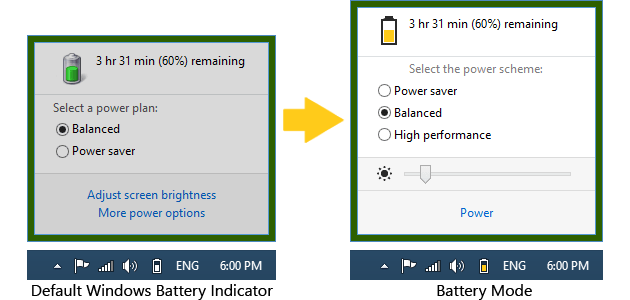
Battery Mode is an advanced power management and battery charge indicator. Power Management Modes allow you to choose what you no longer need at the moment: the duration of the performance, or battery life.

Convenient switching power
• Activate the "Energy Saving" - and your laptop can run for up to two times longer!
• There is a lack of productivity? Retarding system? Not enough FPS in games? Turn on "high performance" to turn off all power-saving features and improve performance.
• Activate the "Balanced" - and the system itself will control the power.

Pleasant lighting control
• There is no need to clamp the cunning combination of keys to adjust the backlight. Just open the Battery Mode and adjust the backlight slider.
• Tired of hopping backlight when you connect the charger or the change of diet? Enable the "Fixed screen brightness" in the "Advanced Settings" - lights will no longer change itself!

Keyboard shortcuts for power users
• Power Management Modes can be switched by means of "hot keys» Alt + Pause.
• Use a utility program NextScheme, to switch modes in your scripts or programs.
• Enter NextScheme * .exe -? to get help.

System requirements
Windows XP / Windows Vista / Windows 7 / Windows 8 / Windows 8.1 / Windows 10

Supported languages
English, French, Brazilian Portuguese, Hungarian, Russian, Ukrainian


DOWNLOAD LINKS:


Citar
https://rapidgator.net/file/22a06eb20836690ecf9dfb8aaf52ea23/Battery_Mode_4.3.3_build_206.rar.html

Citar
https://nitroflare.com/view/6CE49C57AE58DD5/Battery_Mode_4.3.3_build_206.rar
