* Cantinho Satkeys

Refresh History
  • FELISCUNHA: ghyt74  pessoal   49E09B4F
    21 de Agosto de 2026, 11:28
  • JP: try65hytr Pessoal 4tj97u<z 2dgh8i k7y8j0 classic
    21 de Agosto de 2026, 05:22
  • JP: try65hytr Pessoal 4tj97u<z 2dgh8i k7y8j0 43e5r6
    17 de Agosto de 2026, 04:09
  • j.s.: dgtgtr a todos  49E09B4F
    15 de Agosto de 2026, 15:07
  • FELISCUNHA: ghyt74   49E09B4F  e bom fim de semana  4tj97u<z
    15 de Agosto de 2026, 11:45
  • Alberto: Revistas
    15 de Agosto de 2026, 05:32
  • JP: try65hytr Pessoal 4tj97u<z 2dgh8i k7y8j0
    14 de Agosto de 2026, 05:05
  • j.s.: try65hytr try65hytr a todos  49E09B4F 49E09B4F
    11 de Agosto de 2026, 20:26
  • JP: try65hytr Pessoal 2dgh8i k7y8j0 r4v8p
    11 de Agosto de 2026, 04:30
  • FELISCUNHA: ghyt74   4tj97u<z  votos de um santo domingo para todo o auditório  101041
    09 de Agosto de 2026, 11:37
  • cereal killa: ghyt74 e bom fim de semana com muita chupadelas  r4v8p p0i8l
    08 de Agosto de 2026, 11:35
  • FELISCUNHA: ghyt74   49E09B4F  e bom fim de semana   4tj97u<z
    07 de Agosto de 2026, 11:56
  • JP: try65hytr Pessoal  2dgh8i k7y8j0 43e5r6
    07 de Agosto de 2026, 05:31
  • j.s.: dgtgtr a todos  49E09B4F 49E09B4F
    05 de Agosto de 2026, 13:50
  • FELISCUNHA: ghyt74  pessoal   49E09B4F
    05 de Agosto de 2026, 11:22
  • JP: dgtgtr Pessoal  4tj97u<z 2dgh8i k7y8j0
    03 de Agosto de 2026, 18:43
  • FELISCUNHA: dgtgtr   49E09B4F  e bom fim de semana  4tj97u<z
    01 de Agosto de 2026, 12:21
  • JP: try65hytr A Todos  4tj97u<z 2dgh8i k7y8j0 yu7gh8
    31 de Julho de 2026, 05:35
  • j.s.: ghyt74 a todos
    30 de Julho de 2026, 09:51
  • FELISCUNHA: ghyt74  pessoal  49E09B4F
    29 de Julho de 2026, 10:49

Autor Tópico: WinCam 4.0 Multilingual + Portable  (Lida 37 vezes)

0 Membros e 1 Visitante estão a ver este tópico.

Online WAREZBLOG

  • Moderador Global
  • ***
  • Mensagens: 17044
  • Karma: +0/-0
WinCam 4.0 Multilingual + Portable
« em: 08 de Julho de 2026, 12:57 »

WinCam 4.0 Multilingual + Portable Fast Links | 8/4 Mb

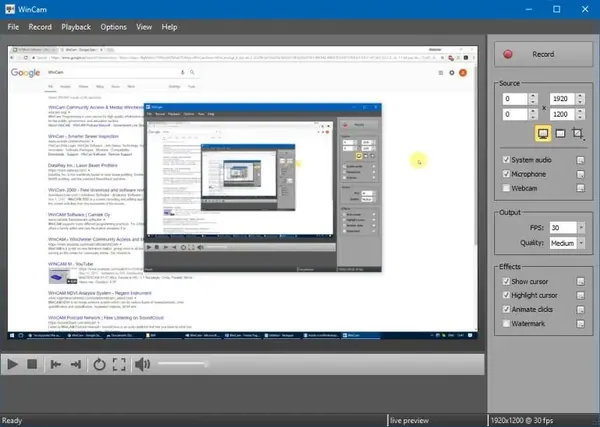
WinCam is a screen recording application designed to capture desktop activity, application windows, and selected areas of the screen with a simple workflow. It allows users to create video recordings for tutorials, software demonstrations, online content, and other screen capture tasks.

The software is suitable for educators, content creators, professionals, and everyday users who need a lightweight solution for recording screen activity. It supports real-time video processing, audio capture, and customizable recording options while keeping the interface easy to use.

With tools for cursor highlighting, audio recording, live preview, and basic editing, WinCam provides a practical environment for creating clear instructional videos, capturing application workflows, and recording media activity directly from the desktop.

How to Use Portable Version
No installation is required. Extract the package and run the main executable directly, or use it from a USB drive for portable operation.

Key Features:
  • Record a specific application, screen region, or entire desktop
  • Capture video at up to 60 frames per second
  • Use hardware acceleration for real-time rendering and encoding
  • Preview recording settings and effects before capture
  • Adjust video source, frame rate, and post-processing options
  • Highlight the cursor with zoom, effects, and click animations
  • Record system audio, microphone input, or both simultaneously
  • Automatically process and mix audio during recording
  • Perform basic video trimming after recording
  • Save edited clips as new files or overwrite existing recordings
  • Use hotkeys for quick screen recording control

System Requirements:
  • Windows 8 / 8.1
  • Windows 10
  • Windows 11
  • Native 64-bit operating system support

Home Page -
Código: [Seleccione]
http://www.ntwind.com/
Recommend Download Link Hight Speed | Please Say Thanks Keep Topic Live
Links are Interchangeable - No Password - Single Extraction