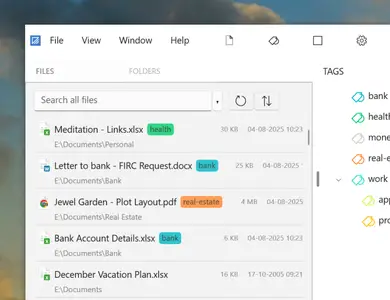
 Free Download Filezo 6.0.13 (x86/x64) | 130 MB
Filezo instantly finds any file, folder or app on your Windows PC at a lightning speed. Type few keystrokes and launch! That's it! Filezo's smart search ensures meaningful & clutter-free results. This app makes your computing life joyful by stealing away tedious clicks. Saves enormous time and effort!
- Quickly access any document, folder, or program on Windows in less than 5 seconds! May it be on your local hard drive, cloud drive or a network drive.
- Tag files and folders to group them logically and access them even faster. Supports hierarchical tags and color coding.
Avoid every day's unnoticed stress resulting from- Finding scattered files
- Navigating through deep folders
- Accessing slow network paths
- Searching cluttered Windows desktop
- Filezo integrates with the Windows File open/save window, allowing you to directly pick any file/folder from Filezo.
- Filezo has an inbuilt file previewer to quickly take a glance at the document, picture, audio or video file.
- Filezo automatically tracks your recently accessed and recently downloaded files. It makes launching even faster.
- And there is a lot more.
Saves a lot of timeInstantly launch any doc, folder or app with very few keystrokes.
Avoids outdated ways of accessing foldersFilezo avoids tedious navigation of folders. No need to access deep folder trees & menus to launch any document, folder or program. Just type & go!
Made even easierAssign tags to files & folders. Group them based on projects. Access them in a single click. Assign tags directly from within Windows File Explorer.
Transfer or share tags with othersTagged files can be copied to other locations, network drives. Plus, you can share your tagged files with other Filezo users.
There is nothing to learnFilezo is simple & works out of the box. You don't need to configure your favorite files or folders. Just install & see the magic.
Best on topAutomatically tracks the files and folders that are more important to you. Recently downloaded and recently accessed files are listed first. It makes launching easier.
Bypass your file managerPerform frequent file operations such as copying, deleting, renaming files without launching your file manager app.
Add a personal note to any file or folderAdd a text note to any file or folder. Locate them quickly by searching inside the notes.
Access remote folders like localAutomatically lists the network folders that you access. Launching a network folder any level deep takes less than 3 seconds.
Does more than just launchingPick and attach a file to email using drag & drop, use inbuilt previewer to quickly compare documents, pictures, audio or video files.
Best Features- Automatically knows your favorite files & folders
- Tag files and folders
- Annotate files and folders
- Preview several file types
- Select files faster in File open/save window
- Innovative ways of copying files
- Effortlessly launch any file or folder
System RequirementsFilezo runs on Windows 11 & Windows 10 (32-bit and 64-bit)
Home Page -https://www.conceptworld.comRecommend Download Link Hight Speed | Please Say Thanks Keep Topic Live
Links are Interchangeable - No Password - Single Extraction

 Cantinho Satkeys
