Safe Software FME Desktop v2020.0.20200 (MacOSX)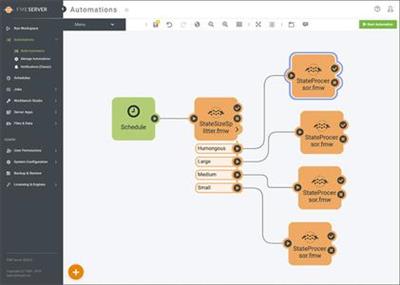
Safe Software FME Desktop v2020.0.20200 (MacOSX) | 1.34 GB
Information:
Stop fighting your data and start using it. FME Desktop supports 450+ formats and applications to help you integrate and transform your data exactly for your needs. Build workspaces in FME Desktop's drag-and-drop interface and re-use your workflows anytime you need to.
While coding is not required to build workflows, FME Desktop supports languages like Python and R to give you the flexibility to extend your workflows. From simple data conversions or complex integrations, FME Desktop can do it all!
Hundreds of Data Options
FME Desktop is used in local governments, utilities, and many other industries to facilitate data integration workflows with its powerful data conversion capabilities.
Read from or write to any of the 450+ supported formats and applications. Choose what tools and applications you want to use based on your needs, and let your data follow your lead.
Custom Transformations
Turn your data conversion workflows into data transformation workflows by using FME transformers. Everyone's data needs are unique and your data workflows should be, too!
Connect transformers any way you'd like to ensure you are generating the exact dataset you need. Set and save your parameters so they can be preset the next time you create a workflow. Every second counts!
Sleek Visual Interface
Not only is FME Desktop powerful - it's fun and easy to use too! Drag and drop your readers, transformers, and writers in the order you'd like and connect them together.
Customize your display with options like dark-mode, styled connection lines, and bookmarks that help organize various parts of your workflow. FME Desktop is all about doing things the way you want to.
Preview Data Changes
Experimenting with data transformations can help you uncover more details about your data. Inspect and preview your data at any transformation point of your workflow directly within FME Desktop without committing to saving a new file on your computer.
This provides you with the freedom to review how the workflow changes your data without creating multiple copies of your files. You can even view dynamic changes by using Animate Mode or render 3D models to observe how and where your changes are taking place.
Reduce, Re-use, Real-Time
FME Desktop is not just for one-time data integration tasks. Build workflows that help you combat recurring data tasks and even automatically run your workflows with FME Server.
Extend what you've built in FME Desktop to become event-based workflows that integrate data, send notifications, or upload data to your cloud storage network. Connect your FME Desktop workflows to FME Server Automations directly with the Automations writer.
https://www.safe.com/DOWNLOAD LINKS :
https://nitroflare.com/view/7031ECA9F4F6BB5/Meera169_Safe_Software_FME_Desktop_v2020.0.20200_MacOSX.part1.rar
https://nitroflare.com/view/4D11410D226C472/Meera169_Safe_Software_FME_Desktop_v2020.0.20200_MacOSX.part2.rar

https://uploadgig.com/file/download/E5923834036c8eca/Meera169_Safe_Software_FME_Desktop_v2020.0.20200_MacOSX.part1.rar
https://uploadgig.com/file/download/d1Ea490B0B006E56/Meera169_Safe_Software_FME_Desktop_v2020.0.20200_MacOSX.part2.rar

https://rapidgator.net/file/ac90c20ff016a814e4483fc0e9f61874/Meera169_Safe_Software_FME_Desktop_v2020.0.20200_MacOSX.part1.rar.html
https://rapidgator.net/file/99116c0b6fddda9cc832a51d5ec77b5c/Meera169_Safe_Software_FME_Desktop_v2020.0.20200_MacOSX.part2.rar.html

 Cantinho Satkeys
