 Free Download WinToUSB 10.5 (x86/x64) Multilingual + Portable All Editions | 42.4/107.6 Mb
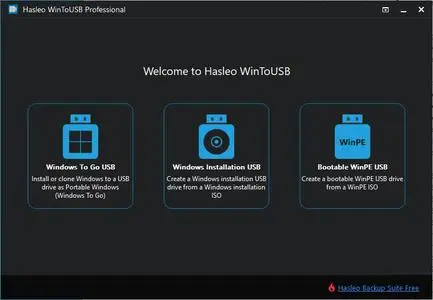
WinToUSB (also called Windows To USB) is the best free Windows To Go (WTG) Creator which allows you to install and run a fully-functional Windows on external hard drive, USB flash drive or Thunderbolt drive. It is so easy and efficient, with just 3 steps and a few minutes, you can create your first portable Windows 11/10/8/7 or Windows Server directly from an ISO, WIM, ESD, SWM, VHD, VHDX file or CD/DVD drive, or you can clone existing Windows installation to USB or Thunderbolt drive as portable Windows. WinToUSB also supports creating Windows installation USB flash drive from Windows 11/10/8/7 and Windows Server installation ISO, with it you can install Windows from the USB flash drive easily.
Creation of WTG from ISO, WIM, ESD, SWM, VHD(X) or DVD drive.
Creation of WTG from system image file produced by Hasleo Backup Suite.Improved
Clone Windows to USB/Thunderbolt drive as portable Windows.
Creation of Windows To Go on Non-Certified Windows To Go USB drive.
Encrypt Windows To Go with BitLocker to keep your data safe.
Creation of Windows installation/WinPE USB drives with BIOS & UEFI support.Improved
Download Official Windows 11/10 ISO file from Microsoft.
Any version of Windows 11/10/8/7 (X64/X86/ARM64) & Server 2008 or later is supported.
Windows To Go (Portable Windows) Creator
WinToUSB allows you to install & run fully-functional Windows on an external HDD/SSD, USB flash drive or Thunderbolt drive, which means you can carry the portable Windows drive to anywhere and use it on any computer.
- Use any version of Windows 11/10/8/7 and Windows Server to create Windows To Go Workspace
- Creation of Windows To Go from an ISO, WIM, ESD, SWM, VHD(X) image file or CD/DVD drive
- Clone existing Windows installation to USB drive or Thunderbolt drive as portable Windows
- Creation of Windows To Go on Non-Certified Windows To Go drive
- Hot clone Windows without restarting the source computer to be cloned
- Create BitLocker encrypted Windows To Go Workspace
- Support for creating VHD/VHDX-based Windows To Go Workspace
Windows Installation USB Creator
WinToUSB releases a feature called "Windows Installation USB Creator" which allows you to create a Windows installation USB flash drive from a Windows 11/10/8/7/vista/2019/2016/2012/2008 installation ISO file with a few simple steps, with this feature you can create a bootable Windows installation USB drive to install Windows on both Traditional BIOS and UEFI computers by using the same USB drive.
Windows PE Bootable USB Creator
WinToUSB also supports creating a bootable Windows PE USB drive, it can help you transfer the contents of a Windows PE image to a USB drive and make the USB drive bootable.
System Requirements:Supported operating systems: Windows 7 or later
CPU: Intel® Pentium® processor 1GHz (32 bits or 64 bits) or above
RAM: 1024 MB or more of RAM (2048MB Recommended)
Disk Space: 1024 MB and above free space
Home Page-
https://www.easyuefi.com/Recommend Download Link Hight Speed | Please Say Thanks Keep Topic Live
Links are Interchangeable - No Password - Single Extraction

 Cantinho Satkeys
