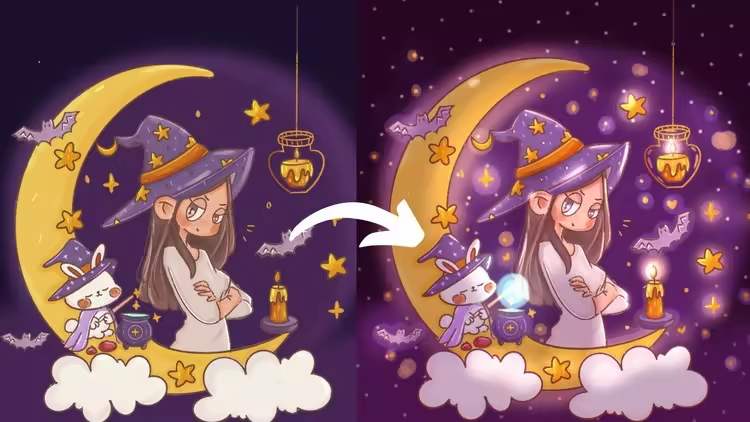
 Free Download Create Magical Lighting and Shading in Procreate Secrets
Published 1/2026
MP4 |
Video: h264, 1920x1080 |
Audio: AAC, 44.1 KHz, 2 Ch
Language: English |
Duration: 30m |
Size: 946 MB
Master lighting in Procreate: From refined sketch lines to soft, dreamy highlights and professional layer setups
Master soft glowy dreamy lighting effects in Procreate using blending modes, clipping masks, and blur techniques
Create magical glowing atmospheres using Multiply, Add, and Overlay blending modes for depth and warmth
Apply realistic light and shadow techniques to add dimension and ethereal quality to digital illustrations
Build artwork from sketch to final glow using layers, masks, and texture for enchanting fantasy art
RequirementsAn iPad and Procreate app installed (no prior digital art experience needed - beginners are welcome!)
DescriptionUnlock the Magic of Digital Illustration in Procreate!Have you ever wondered how digital artists get that soft, ethereal glow in their work? In this focused, step-by-step masterclass, you will learn how to transform a simple idea into a polished, magical illustration using the power of Procreate on iPad.Whether you are a beginner looking to understand the fundamentals or an intermediate artist wanting to add "sparkle" to your portfolio, this course walks you through a professional digital art workflow used by successful illustrators.What you will learn in this course:Refining Your Vision: Learn how to take a rough sketch and turn it into clean, professional line art.Color Foundations: Master base coloring and how to choose a palette that evokes a "moody" or "magical" atmosphere.Advanced Layer Techniques: Demystify Clipping Masks and layer organization to keep your workflow efficient and non-destructive.The Art of the Glow: Use Soft Blur (Gaussian Blur) and Blend Modes to create dreamy highlights that make your characters pop.Professional Finishing: Add those final "witchy" details like floating lanterns, stars, and bats to complete your storytelling.Why take this course? Unlike broad "How to use Procreate" classes, this course is project-based. You aren't just learning tools; you are learning how to create a specific, high-demand art style. By the end of this tutorial, you'll have a finished piece of "Witchy Art" ready for social media or your professional portfolio.Who is this for?Digital artists who want to improve their lighting and shading techniques.Procreate beginners who want a clear, easy-to-follow project.Illustrators interested in character design and magical themes.
Requirements:An iPad with Procreate installed.An Apple Pencil (or compatible stylus).A basic understanding of the Procreate interface (though we cover the essentials!).
Who this course is forDigital artists who want to add magical glowing lighting effects to their Procreate illustrations, from beginners learning digital art to experienced artists seeking new techniques for creating dreamy, ethereal atmospheres in cute art, cozy vibes, or fantasy illustrations
Homepagehttps://www.udemy.com/course/create-magical-lighting-and-shading-in-procreate-secrets/Recommend Download Link Hight Speed | Please Say Thanks Keep Topic Live
No Password - Links are Interchangeable

 Cantinho Satkeys
