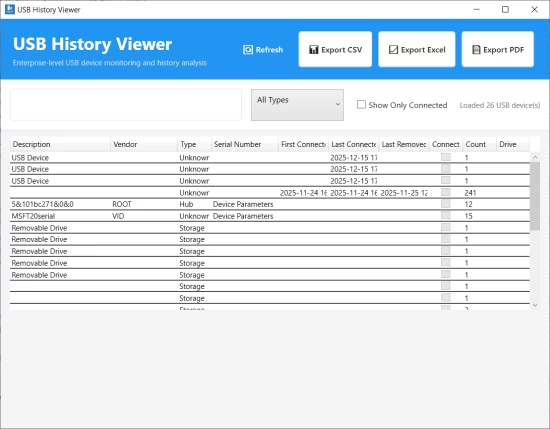
 BytesMorph USB History Viewer 2.0 (x64) Multilingual
File Size: 61.6 MB USB History Viewer is a powerful, enterprise-grade application designed for IT professionals, system administrators, and forensic investigators. It provides the most comprehensive tracking and analysis of all USB devices that have ever been connected to a Windows system, offering detailed forensic information and real-time monitoring capabilities.
COMPLETE USB DEVICE HISTORY
View all USB devices ever connected to your system, even after they've been removed. Access historical data from multiple Windows sources including Registry, Event Logs, SetupAPI logs, WMI queries, and more. Track devices across their entire lifecycle with detailed connection and removal timestamps.
DETAILED DEVICE INFORMATION
Get comprehensive device details including
• Vendor ID (VID) and Product ID (PID) for device identification
• Serial numbers and unique device identifiers
• Vendor and product names
• Device types (Storage, Bluetooth, Phone, Printer, Camera, Audio, Keyboard, Mouse, Network, Hub, and more)
• First and last connection timestamps
• Last removal timestamp
• Connection count statistics
• Drive letter assignments
• Volume labels and total size (for storage devices)
FORENSIC-GRADE DATA COLLECTION
USB History Viewer reads from 22+ Windows data sources to provide the most comprehensive USB device history available
Registry Sources
• USBSTOR - USB storage devices
• USB - All USB devices
• USBPRINT - USB printers
• USBVIDEO - USB cameras and webcams
• DeviceClasses - Device class information
• Portable Devices - Portable device registry
• DeviceContainers - Device container information
• MountedDevices - Drive letter mappings
• MountPoints2 - User mount points
• Alternate Control Sets - Backup registry data
• USB Service Enumerations - USB hub, port, and controller services
• USB Device Class GUIDs - Device class-specific data
Log Sources
• System Event Log - Device connection/removal events
• Security Event Log - Security-related USB events
• Application Event Log - Application-level USB events
• DriverFrameworks-UserMode - Windows 10+ USB framework events
• SetupAPI Device Log - Device installation history
• SetupAPI Application Log - Application installation history
WMI Sources
• Win32_USBController - USB controllers
• Win32_USBHub - USB hubs
• Win32_USBControllerDevice - Controller-device relationships
• Win32_PnPEntity - Plug and Play entities
• Win32_DiskDrive - Disk drives
• Win32_LogicalDisk - Logical disk information
ADVANCED FILTERING & SEARCH
• Real-time search - Search across all device fields (name, vendor, serial number, VID, PID, etc.)
• Device type filtering - Filter by Storage, Bluetooth, Phone, Printer, Camera, Audio, Keyboard, Mouse, Network, Hub, or Unknown
• Connection status filter - Show only currently connected devices
• Sortable columns - Sort by any column for easy data analysis
• Connection count tracking - See how many times each device has been connected
MULTIPLE EXPORT FORMATS
Export your USB device history in professional formats
• CSV Export - Comma-separated values for spreadsheet analysis
• Excel Export (XLSX) - Native Excel format with professional formatting, multiple sheets, and data validation
• PDF Export - Professional PDF reports with tables, summaries, and formatted layouts
All exports include complete device information and are ready for compliance reporting, forensic documentation, or audit purposes.
REAL-TIME MONITORING
• Automatic detection - Automatically detects USB device connections and disconnections
• Live updates - Real-time updates when devices are connected or removed
• Visual indicators - Clear visual indicators for currently connected devices
• Event notifications - Get notified when devices are inserted or removed
ENTERPRISE-READY FEATURES
• No admin rights required - Basic viewing works without administrator privileges
• Works on Windows 10 & 11 - Fully compatible with modern Windows versions
• Modern UI - Clean, intuitive user interface designed for professionals
• Detailed information panel - Expandable device information panel with all details
• Performance optimized - Efficient data loading and processing for large device histories
• Error handling - Gracefully handles permission issues and missing data sources
USE CASES
IT Administrators
Monitor USB device usage across your organization, track unauthorized device connections, generate compliance reports, audit device access history, and maintain device inventories.
Forensic Investigators
Recover deleted USB device history, analyze device connection timelines, extract serial numbers and device identifiers, document evidence for investigations, and create forensic reports.
Security Professionals
Identify potential security risks from USB devices, track device connection patterns, monitor removable storage usage, generate security audit reports, and detect suspicious device activity.
System Administrators
Troubleshoot USB device issues, track device installation history, monitor system hardware changes, maintain device inventory, and analyze device compatibility.
Compliance Officers
Generate compliance reports, audit device access, track removable media usage, document device history for regulatory requirements, and export data for compliance documentation.
PRIVACY & SECURITY
USB History Viewer operates entirely locally on your device. No data is transmitted to external servers. All device information is read from your local Windows system and remains private and secure. Your USB device history never leaves your computer.
HOMEPAGEhttps://apps.microsoft.com/detail/9ncm9q53sm5q?hl=en-GB&gl=PK
DOWNLOAD https://rapidgator.net/file/764e889df80748951549d18648b346fd/BytesMorph_USB_History_Viewer_v2.0..rar.html
https://k2s.cc/file/1db660ef92669/BytesMorph_USB_History_Viewer_v2.0..rar

 Cantinho Satkeys
