 Free Download SysGauge 13.3.24 | 32.3 MbSysGauge
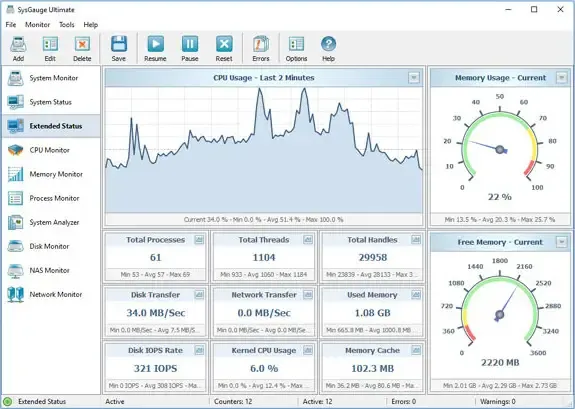
 is a system and performance monitoring utility for tracking hardware, operating system, storage, network, USB, file system, and process activity. It provides detailed monitoring counters and graphical views that help users examine current resource usage and system performance.
The application can monitor CPU and memory utilization, network transfer rates, disk activity, disk space, file system performance, USB activity, and running processes. Storage monitoring includes disk read and write activity, transfer rates, and IOPS for individual logical disks or physical disks installed in the computer.
SysGauge also provides configurable monitoring profiles, reports, rules, actions, charts, and notification options for users who need to observe system behavior over time.
SysGauge provides a centralized environment for configuring and reviewing system performance counters. Users can select predefined or custom monitoring profiles, display system activity through charts, analyze the current state of a computer, and save monitoring information as reports.
The application can also be configured to issue sound and email notifications. Monitoring rules and actions allow users to define responses to selected system conditions and receive email notifications when configured errors occur.
Key Features- Monitors CPU and memory usage.
- Tracks network transfer activity.
- Monitors operating system performance.
- Tracks resource usage of running processes.
- Monitors file system performance.
- Tracks USB activity and performance.
- Monitors available disk space.
- Tracks disk read and write activity.
- Monitors disk read and write transfer rates.
- Tracks disk read and write IOPS.
- Supports monitoring of individual logical disks and physical disks.
- Displays system monitoring charts.
- Supports predefined and custom monitoring profiles.
- Provides system monitoring reports.
- Supports monitoring rules and actions.
- Provides sound and email notifications.
System MonitoringThe main SysGauge interface allows users to configure system and performance monitoring counters, view monitoring charts, analyze system status, generate reports, and configure sound or email notifications.
The System Monitor module supports predefined and custom monitoring profiles. Users can add, edit, or remove monitoring counters, create reports, and define monitoring rules, actions, and error email notifications.
Monitoring CountersThe Add Counter interface provides access to counters covering CPU usage, memory usage, disk activity, network activity, USB activity, operating system status, file system performance, and running processes.
This allows monitoring configurations to be tailored to the specific resources that need to be observed on a computer.
CPU MonitoringThe dedicated CPU Monitor displays total CPU usage, user CPU usage, kernel CPU usage, CPU interrupt time, CPU interrupt rate, and current CPU frequency. It also reports C1, C2, and C3 low-power state information.
Memory MonitoringThe Memory Monitor provides detailed information about memory utilization, including free and used memory, memory cache size, cache peak size, cache fault rate, page file usage, page file peak usage, and page fault rate.
Process MonitoringThe Process Monitor displays currently running processes and provides individual resource information for each process. Available statistics include CPU usage, memory usage, thread count, handle count, process instance count, data transfer rate, read and write transfer rates, page fault rate, and non-paged memory allocation.
System RequirementsWindows XP, Vista, 7, 8, 8.1, 10 Server 2003, 2008, 2008 R2, 2012, 2012 R2, 2016, 2019
Frequently Asked QuestionsWhat is SysGauge used for?SysGauge is used to monitor system and performance activity, including CPU, memory, storage, network, USB, file system, operating system, and running process resources.
Can SysGauge monitor disk IOPS?Yes. The software can monitor disk read IOPS and disk write IOPS for individual logical disks or physical disks.
Does SysGauge provide process-level monitoring?Yes. Its Process Monitor displays resource information for individual running processes, including CPU usage, memory usage, threads, handles, and data transfer activity.
Can SysGauge generate reports?Yes. The application can save various types of system monitoring reports.
Does SysGauge support notifications?Yes. It supports configurable sound and email notifications, including error email notifications within monitoring profiles.
Home Pagehttps://www.sysgauge.com/
Product Information- Software Name: SysGauge
- Version: 13.3.24
- Languages: English
- License type: Full Version
- File Size: 32.3 Mb
Recommend Download Link Hight Speed | Please Say Thanks Keep Topic Live
Links are Interchangeable - No Password - Single Extraction

 Cantinho Satkeys
