 Free Download Advanced CSV Converter 7.98 | 3.2 MbAdvanced CSV Converter
 is a data conversion utility designed to transform CSV files into a variety of commonly used database, spreadsheet, text, and document formats. It provides a guided workflow that helps users convert data quickly while maintaining control over export settings and file structure.
The software is suitable for database administrators, developers, data analysts, and office users who regularly exchange information between different applications. It supports both individual file conversion and batch processing, making it practical for handling large collections of CSV files.
With customizable filtering options, command-line support, and a straightforward conversion wizard, Advanced CSV Converter simplifies data migration and export tasks without requiring additional database drivers.
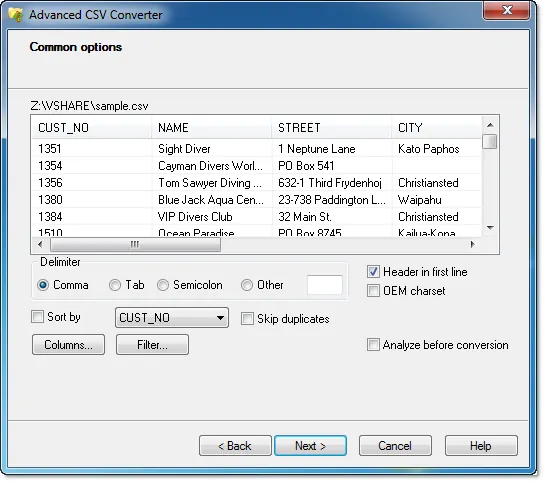
Software OverviewAdvanced CSV Converter provides a step-by-step interface for importing CSV files and exporting them into multiple output formats. Users can choose the destination format, configure export options, and specify which columns or records should be included in the final output.
The application supports conversion by example, allowing users to filter records and customize exported data according to specific requirements. Batch processing capabilities further improve productivity by converting multiple CSV files in a single operation.
For automation and scripting purposes, the software also supports command-line operation, making it suitable for repetitive data conversion workflows.
Key Features- Convert CSV files to DBF, XLS, XLSX, TXT, HTML, PRG, XML, SQL, RTF, and Fixed Width Text.
- Use a guided conversion wizard for step-by-step processing.
- Convert individual files or multiple files in batch mode.
- Filter records using conversion-by-example options.
- Select specific columns for export.
- Customize delimiters and export settings.
- Support command-line operation for automated workflows.
- Provide fast and accurate data conversion.
- Operate without requiring external ODBC or BDE drivers.
Why Choose Advanced CSV ConverterAdvanced CSV Converter is designed for users who need a simple and reliable way to convert CSV data into multiple formats used by database, spreadsheet, and reporting applications. Its batch processing, filtering options, and command-line support make it suitable for both interactive use and automated workflows.
The software is appropriate for developers, database administrators, business users, and anyone who frequently exchanges structured data between different software platforms.
System RequirementsWindows 7, 8/8.1, 10, 11
Frequently Asked QuestionsWhat is Advanced CSV Converter used for?Advanced CSV Converter is used to convert CSV files into various database, spreadsheet, text, and document formats.
Which output formats are supported?The software supports DBF, XLS, XLSX, SQL, TXT, Fixed Width Text, HTML, PRG, XML, and RTF formats.
Can Advanced CSV Converter process multiple files at once?Yes. The software supports batch conversion for processing multiple CSV files in a single operation.
Does the software support command-line execution?Yes. Advanced CSV Converter includes command-line support for automated conversion tasks.
Home Pagehttp://www.dbf2002.com
Product Information- Software Name: Advanced CSV Converter
- Version: 7.98
- Languages: English
- License type: Full Version
- File Size: 3.2 Mb
Rapidgatorhttps://rapidgator.net/file/3637515238e3d1143c7a88f1d75d070b/84bmd.Advanced.CSV.Converter.7.98.rar.html
https://nitroflare.com/view/6E9667E2F369F45/84bmd.Advanced.CSV.Converter.7.98.rar

 Cantinho Satkeys
