* Cantinho Satkeys

Refresh History
  • j.s.: try65hytr a todos  49E09B4F
    30 de Junho de 2026, 21:02
  • JP: try65hytr Pessoal  4tj97u<z  2dgh8i k7y8j0 r4v8p
    30 de Junho de 2026, 05:31
  • JP: try65hytr Pessoal  4tj97u<z 2dgh8i k7y8j0 classic
    26 de Junho de 2026, 05:05
  • cereal killa: ghyt74 e continuaçao bom sao joao  wwd46l0'
    24 de Junho de 2026, 12:16
  • JP: try65hytr Pessoal  4tj97u<z 2dgh8i k7y8j0 xe4s
    24 de Junho de 2026, 04:05
  • FELISCUNHA: ghyt74   4tj97u<z e bom São João  h7i37
    23 de Junho de 2026, 10:55
  • j.s.: dgtgtr a todos  49E09B4F
    20 de Junho de 2026, 15:51
  • FELISCUNHA: ghyt74   49E09B4F  e bom fim de semana  4tj97u<z
    20 de Junho de 2026, 11:31
  • JP: try65hytr Pessoal  4tj97u<z 2dgh8i k7y8j0
    19 de Junho de 2026, 04:41
  • romi: Beleza
    19 de Junho de 2026, 04:28
  • cereal killa: try65hytr pessoal  2dgh8i
    18 de Junho de 2026, 23:28
  • JP: dgtgtr Pessoal  2dgh8i k7y8j0 r4v8p
    18 de Junho de 2026, 19:48
  • joaozinho_bosco: boas tardes.......há quanto tempo
    18 de Junho de 2026, 14:35
  • j.s.: dgtgtr a todos  49E09B4F
    16 de Junho de 2026, 18:24
  • JP: try65hytr Pessoal  2dgh8i k7y8j0 classic
    16 de Junho de 2026, 05:44
  • j.s.: bom fim de semana  4tj97u<z
    13 de Junho de 2026, 11:23
  • j.s.: ghyt74 a todos  49E09B4F
    13 de Junho de 2026, 11:23
  • JP: try65hytr A Todos  4tj97u<z 2dgh8i k7y8j0 r4v8p
    12 de Junho de 2026, 05:28
  • JP: try65hytr Pessoal  2dgh8i k7y8j0 yu7gh8
    10 de Junho de 2026, 03:47
  • j.s.: passem por aqui [link]
    09 de Junho de 2026, 20:57

Autor Tópico: Battery Mode 4.3.2 build 206  (Lida 17 vezes)

0 Membros e 1 Visitante estão a ver este tópico.

Online mitsumi

  • Sub-Administrador
  • ****
  • Mensagens: 133972
  • Karma: +0/-0
Battery Mode 4.3.2 build 206
« em: 18 de Junho de 2026, 10:43 »


Battery Mode 4.3.2 build 206 | Size: 5.67 MB
Language: English


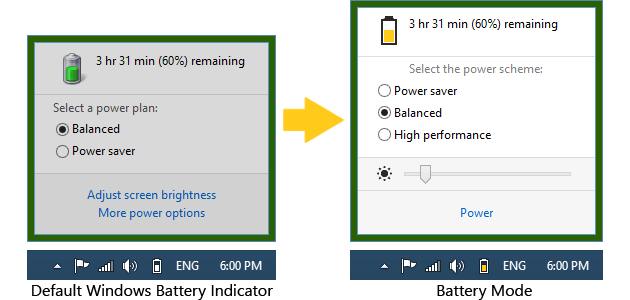
Battery Mode is an advanced power management and battery charge indicator. Power Management Modes allow you to choose what you no longer need at the moment: the duration of the performance, or battery life.

Convenient switching power
• Activate the "Energy Saving" - and your laptop can run for up to two times longer!
• There is a lack of productivity? Retarding system? Not enough FPS in games? Turn on "high performance" to turn off all power-saving features and improve performance.
• Activate the "Balanced" - and the system itself will control the power.

Pleasant lighting control
• There is no need to clamp the cunning combination of keys to adjust the backlight. Just open the Battery Mode and adjust the backlight slider.
• Tired of hopping backlight when you connect the charger or the change of diet? Enable the "Fixed screen brightness" in the "Advanced Settings" - lights will no longer change itself!

Keyboard shortcuts for power users
• Power Management Modes can be switched by means of "hot keys» Alt + Pause.
• Use a utility program NextScheme, to switch modes in your scripts or programs.
• Enter NextScheme * .exe -? to get help.

System requirements
Windows XP / Windows Vista / Windows 7 / Windows 8 / Windows 8.1 / Windows 10 Supported languages
English, French, Brazilian Portuguese, Hungarian, Russian, Ukrainian


DOWNLOAD LINKS:


Citar
https://rapidgator.net/file/dc6293528a921dbb5d1ce4e686cd20f0/Battery_Mode_4.3.2_build_206_.rar.html

Citar
https://nitroflare.com/view/D0F9EC896C0033E/Battery_Mode_4.3.2_build_206_.rar
