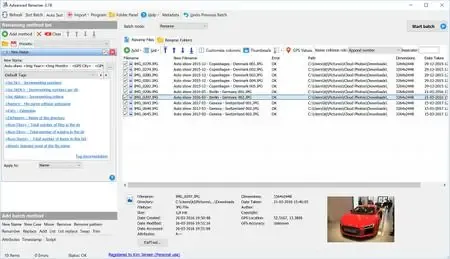
 Free Download Advanced Renamer 4.24 (x64) Commercial Multilingual + Portable | 12.7/14.4 MbAdvanced Renamer
 is a batch file and folder renaming utility that helps users rename, organize, copy, and move large collections of files using customizable rules. This release includes both the standard edition and the Portable edition, allowing users to choose the installation method that best suits their workflow.
The software is suitable for photographers, media collectors, content creators, and IT professionals who regularly manage large numbers of files. It supports flexible renaming methods based on file properties, metadata, timestamps, and other available information, helping maintain consistent and organized file structures.
Advanced Renamer provides an extensive set of batch processing tools for renaming files and folders. Users can combine multiple renaming methods to modify filenames by adding, removing, replacing, or reformatting text, while previewing the results before applying any changes.
The application also supports copying and moving files according to metadata and file information. Built-in preview and undo functionality allows users to verify batch operations and revert changes if necessary.
Specialized support for images, music, and video files enables metadata-based renaming using information such as GPS coordinates, ID3 tags, codecs, and video resolution, making it useful for organizing digital media libraries.
Key Features- Batch rename multiple files and folders.
- Combine multiple renaming methods in a single operation.
- Add, remove, replace, or modify filename text.
- Change file attributes and timestamps.
- Copy or move files based on file information.
- Preview all changes before executing batch operations.
- Undo completed batch renaming operations.
- Thumbnail preview mode for image collections.
- Rename photos using image metadata.
- Add city, country, and state names from embedded GPS data.
- Rename music files using built-in ID3 tag support.
- Rename video files using codec and resolution information.
- Support both installed and Portable editions.
Why Choose Advanced RenamerAdvanced Renamer is designed for users who need efficient tools for managing large collections of files. Its flexible renaming rules, metadata support, and batch processing capabilities simplify file organization while reducing repetitive manual work.
The combination of preview, undo functionality, and media metadata support makes it suitable for personal collections as well as professional workflows.
System Requirements- Operating System: Windows 10 or later
- Architecture: 64-bit
Frequently Asked QuestionsWhat is Advanced Renamer used for?Advanced Renamer is used to batch rename, organize, copy, and move files and folders using customizable renaming rules.
Can Advanced Renamer rename photos using metadata?Yes. It supports image metadata, including GPS information, to create descriptive filenames.
Does the software support music and video files?Yes. It can use ID3 tags for music files and metadata such as codecs and resolution for video files.
Does this release include a Portable edition?Yes. This package includes both the standard installation and the Portable edition.
Home Pagehttps://www.advancedrenamer.com/
Product Information- Software Name: Advanced Renamer
- Version: 4.24
- Architecture: x64
- Languages: Multilingual
- License type: Commercial + Portable
- File Size: 12.7/14.4 Mb
Recommend Download Link Hight Speed | Please Say Thanks Keep Topic Live
Links are Interchangeable - No Password - Single Extraction

 Cantinho Satkeys
