 Free Download Diffchecker 7.1.9 Multilingual Fast Links | 160.2 MbDiffchecker
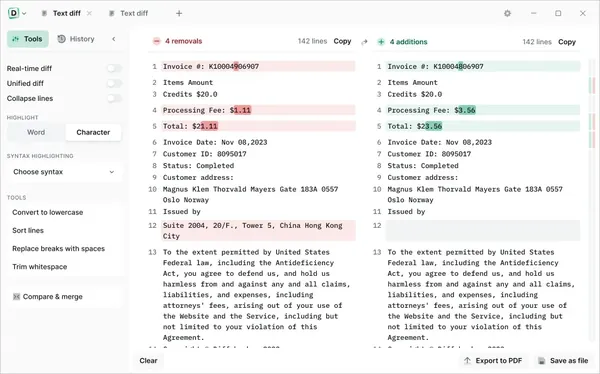
 is a file comparison application that helps users identify differences between text, documents, images, spreadsheets, and folders. Designed for offline operation on Windows systems, it allows users to compare sensitive files locally while keeping data stored on their own computer.
The software is commonly used by developers, legal professionals, business users, and anyone who needs to review changes between documents or datasets. It provides detailed comparison tools for analyzing content differences at character, word, and file structure levels.
Diffchecker Desktop offers a secure comparison environment with support for multiple file types, document analysis, image comparison, and code review workflows. Its offline processing helps users examine confidential information without transferring files to external servers.
Software OverviewDiffchecker provides a comprehensive environment for comparing and reviewing differences between various types of files. The application processes comparison tasks directly on the local computer, allowing users to analyze private documents, source code, and business files while maintaining control over their data.
The software can compare text files with detailed character and word-level analysis, making it suitable for reviewing code changes, contracts, reports, and other documents where accuracy is important. It also includes visual comparison tools for images, allowing users to inspect differences through overlays, fades, and pixel-level comparisons.
Diffchecker Desktop supports document comparison for formats such as Word and PDF, spreadsheet analysis, and folder comparison. Users can examine file structures, locate missing content, and review changes across different versions of their data.
Key Features- Compare text files with character and word-level accuracy.
- Analyze source code with syntax highlighting support.
- Compare images using pixel-level views, overlays, and fade comparisons.
- Extract and compare content from PDF documents.
- Review Word document differences and file changes.
- Compare spreadsheets by analyzing individual cells.
- Compare folders and identify missing or changed files.
- Operate fully offline without sending files to external servers.
- Support multiple programming languages for code comparison.
- Export comparison results in supported formats including PDF.
- Provide an ad-free environment for focused document analysis.
Why Choose DiffcheckerDiffchecker is suitable for users who need a reliable way to review changes across different types of files. Its offline processing approach makes it practical for handling confidential documents, private code, and sensitive business information.
The application combines document comparison, visual analysis, and file organization tools in a single desktop workflow, helping users quickly identify differences and manage revisions.
System RequirementsWindows operating system.
Frequently Asked QuestionsWhat is Diffchecker used for?Diffchecker is used to compare and analyze differences between text files, documents, images, spreadsheets, and folders.
Does Diffchecker work offline?Yes, Diffchecker Desktop is designed to process comparison tasks locally on the computer without requiring files to be uploaded to external servers.
Can Diffchecker compare code files?Yes, it supports code comparison with syntax highlighting for multiple programming languages.
Can Diffchecker compare images and PDFs?Yes, the application includes tools for comparing images and extracting content from PDF documents for analysis.
Home Pagehttps://www.diffchecker.com/desktop/
Product Information- Software Name: Diffchecker
- Version: 7.1.9
- Languages: Multilingual
- License type: Full Version
- File Size: 160.2 Mb
Rapidgatorhttps://rapidgator.net/file/d1b17b0db2a3828cf0ecaeefc0f1c416/euvn0.Diffchecker.7.1.9.Multilingual.rar.html
https://nitroflare.com/view/B6E6530589A7C27/euvn0.Diffchecker.7.1.9.Multilingual.rar

 Cantinho Satkeys
