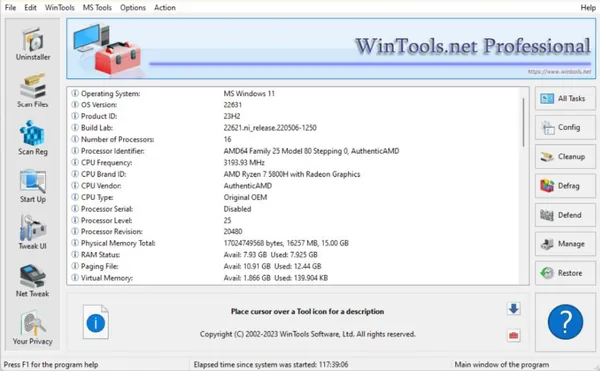
 WinTools.net Professional / Premium / Classic 26.7.1 Multilingual Fast Links | 7.3 MbWinTools.net
 is a collection of Windows maintenance and optimization utilities designed to help users manage system performance, clean unnecessary data, adjust operating system settings, and improve overall stability. The software provides various tools for removing unwanted files, managing startup applications, maintaining the Windows registry, and controlling system preferences.
Designed for users who want more control over their Windows environment, WinTools.net combines multiple system management features into a single interface. It can help clean leftover data from installed applications, remove invalid references, manage privacy-related information, and customize different operating system behaviors.
The suite includes tools for software removal monitoring, registry maintenance, startup control, network configuration, file deletion, and memory management. Different editions provide access to specific features, allowing users to choose the functions that match their system maintenance requirements.
- Remove unwanted software and monitor changes made during program installations.
- Clean obsolete files, unused references, and unnecessary data from storage drives.
- Scan and remove invalid Windows shortcuts from system locations.
- Detect and clean unused registry entries left after software removal.
- Manage startup applications and control programs launched with Windows.
- Customize additional Windows settings related to system behavior and user preferences.
- Adjust hidden network settings to improve connection stability in Professional edition.
- Protect personal information with privacy management tools.
- Securely delete files and documents to prevent easy recovery.
- Monitor and optimize RAM usage with memory management tools.
Why Choose WinTools.net:WinTools.net provides a centralized collection of utilities for maintaining and customizing Windows systems. It is suitable for users who need tools for cleaning system clutter, managing startup processes, and adjusting various operating system settings.
The software can be useful for both everyday maintenance tasks and advanced Windows configuration, offering separate utilities for different aspects of system management.
System Requirements:Operating System: Windows 11/10/8.1/8/7/VISTA/XP/2k8/2k3/2k
FAQ:Q: What is WinTools.net used for?A: WinTools.net is used for Windows maintenance, system cleanup, startup management, privacy control, and operating system customization.
Q: Does WinTools.net include registry cleaning tools?A: Yes. The software includes a registry scanning tool designed to remove unused entries and invalid references.
Q: Can WinTools.net manage programs that start with Windows?A: Yes. The Startup Manager allows users to monitor, enable, disable, add, or remove startup items.
Q: Which editions include network and privacy tools?A: Network tweaking and privacy-related features are available in the Professional edition.
Q: Is WinTools.net compatible with older Windows versions?A: Yes. The software supports a wide range of Windows versions from older systems up to Windows 11.
Home Pagehttp://www.wintools.net/
Product Information:- Software Name: WinTools.net
- Version: 26.7.1
- Architecture:
- Languages: Multilingual
- License type: Full Version
- File Size: 7.3 Mb
Recommend Download Link Hight Speed | Please Say Thanks Keep Topic Live
Links are Interchangeable - No Password - Single Extraction

 Cantinho Satkeys
