 Release Name:
 Room Arranger 11.1.0.790
Size: 43 MB
Description: Room Arranger is 3D room / apartment / floor planner with simple user interface. Once you get the basics, you can draw whatever you imagine.
Easy to Use
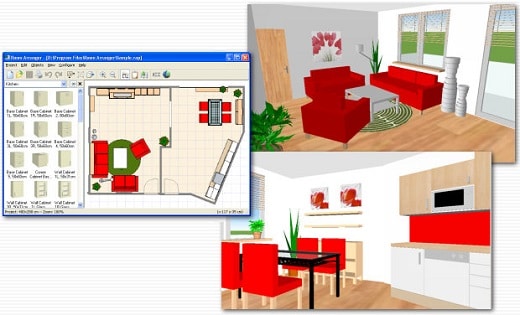
Room Arranger is small and compact piece of software. Still it lets you design nearly anything you imagine. Once you understand the basics it's easy to bring it to next level.
3D Visualization
3D can give you a better impression of your design. Room Arranger will not only let you fly around the scene, but you can also walk through it like in reality. You can also have multiple floors in the single project.
Wide Object Library
There are nearly 300 objects in the standard object library. Furniture, and other equipment. For each of them, you can modify their dimensions exactly as you need - you are not limited to what we think is the most common.
Everybody needs something different. Every piece of equipment is special.
We are not able to put everything into Room Arranger. But you can quickly and easily design all your special objects on your own in it. Some contributed to our On-line object library and shared their work. The program can also be used in the variety of other areas - garden architecture, housing development (houses as objects), webdesign...
3D Visualization
Room Arranger can show your project in 3D. It uses VRML standard for it. So you can put interactive 3D scene on your web. And you can make movies here too.
Build on Floor Plan Image
Drawing walls can be quite time consuming for apartment or house design. So there is a way to make it easier in case you have an image or photo of the floor plan. Load the image of the floor plan into the Wall Editor, calibrate it, and draw walls on top of it.
Measure
There is a measurement tool in Room Arranger that helps you to check if there is enough space left for other objects, or just visualize the dimensions in the project. The software also measures the room areas, wall areas and other useful values. It will let you copy - paste them to Excel for further processing.
Print in Scale
print over more pages
Printing is the integral part of designer's work. We try to make this output precisely and in high quality. Professional architects usually require printouts in exact 1:50 or 1:100 scale, which is possible in Room Arranger. In case you have only small A4 printer, the software manages to print the project over more pages. You will just glue all sheets of paper together.
Features:Each wall and floor can have separate color / material
Annotations
Snap objects to near walls while moving them with mouse
Baseboards and crown moldings
Doorframe has editable thickness and color
Picture can have frame with editable thickness and color
Groups within groups of objects, option to forbid ungrouping (with password)
The software is translated into many languages, but we are still searching for new ones.
https://rapidgator.net/file/62e44735649d36b93d0fba0cf4fd4fa9/Room.Arranger.11.1.0.790.rar.html
https://nitroflare.com/view/D816C5F1B89553F/Room.Arranger.11.1.0.790.rar

 Cantinho Satkeys
