 InstallerClean 1.7 | Size: 90.43 MB
Language: EnglishInstallerClean is a small tool made to clean up hidden leftover files that Windows keeps after installing or updating programs.
A simple, focused interface
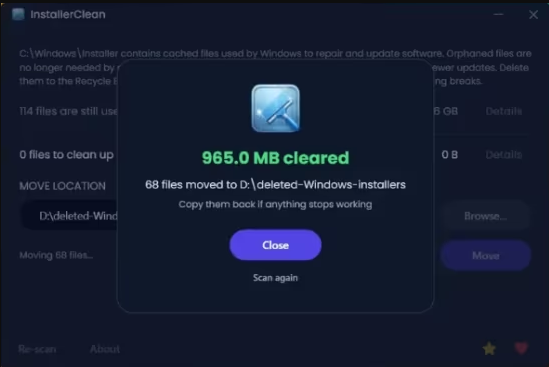
The UI is very simple, showing a list of installer files with details like their size and whether they can be removed. At the end, it clearly displays how much space can be freed and gives a straightforward prompt after the cleanup is done.
It is designed to be a no-fuss tool: the scan runs automatically on startup, but both Delete and Move require confirmation before anything is changed. You see the count and total size before proceeding, so you have full control.
It double-checks before deleting anything
At this point, you may be wondering if the app is safe and the short answer is yes. After it scans the Windows installer files folder, it checks with the OS to determine what is safe to remove based on the Windows record of installed programs. In fact, the app asks Windows directly through its built-in installer system, not guessing or scanning blindly.
The developer explains that the app is designed to look for two types of junk, which are the orphaned files and the superseded patches. The latter are basically older update files that got replaced by newer ones, so Windows has already moved on but keeps the old files sitting there.
InstallerClean can be used occasionally or when you're re-installing many programs, as those junk files don't gather as often as you think. A completion screen shows exactly what was found and removed so you can review the result.
System Requirements: Windows 11, Windows 10, 8 , 7
DOWNLOAD LINKS:https://rapidgator.net/file/e9607a4b21ba0de6e7d17b35758e71f3/InstallerClean_1.7.rar.html
https://nitroflare.com/view/B30270B098C307C/InstallerClean_1.7.rar

 Cantinho Satkeys
