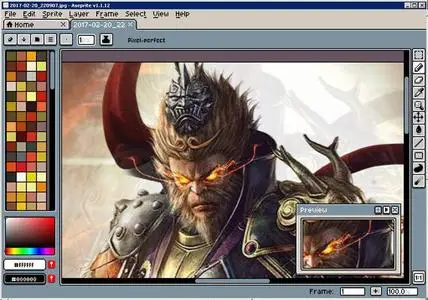
 Free Download Aseprite 1.3.17 (Win/macOS/Linux) | 18.3/32.4/27.3 Mb
A user-friendly animated sprite editing application that enables you to create pixel art and edit your images using a variety of tools. Animations and visual effects are nowadays used to enhance nearly every form of multimedia, including video games. These are created by combining multiple images and effects, with an abundance of applications at your disposal. Aseprite is one of them and offers a different approach on image editing and creating short animations.
Intuitive design makes it easy to use
-If you're nostalgic about the past era of pixel graphics and effects, you might just find this to be a suitable environment. This is not only because of the application's aim to create such sprites, but the interface is fully designed this way as well. Although you get the impression of an old video game, with icons and tools being a little difficult to identify, accommodation is no problem at all.
Clever file support and drawing tools
-The result is either an enhanced picture or short animation to use in your project, but until you get there some effort needs to be invested. You can import a decent amount of image file formats like JPG, PCX, GIF, BMP, FLC, ASE and more. The same can be said about exporting, with additional options to save entire animation strips.
-Once you're set up and happy with image selection, you're free to use drawing tools for enhancement. Don't be fooled by the pixel graphics, because the application is capable of powerful results. A toolbar holds all brushes you need to draw lines, various geometrical shapes, spray areas and more. Multiple color palettes are at your disposal, further broadening the number of possibilities.
Add effects and edit animation frames
-Furthermore, you can completely alter or enhance images by applying one of the many effects. Ranging from a few types of blur to a color curve graph, these are applied instantly. Before the image is changed, a small window lets you configure effects, with real time feedback on your work.
-An implemented layer manager is there and allows you to better manage objects. This comes in handy, especially when used with transparency options. What's more, you can bring up a timeline that handles all the frames of your animation, with the possibility to individually tweak them.
In conclusion
-Taking everything into consideration, we can say that Aseprite is a handy and fun utility which combines various drawing tools, effects and timeline editor so you can either create pixel art or animations. Visual design is impressive and different from others of its kind, which counts as a plus. Some minor functionality issues are encountered here and there, but if you manage to overlook them, your experience is well rewarded in the end.
Home Page-
https://www.aseprite.org/Recommend Download Link Hight Speed | Please Say Thanks Keep Topic Live
Links are Interchangeable - No Password - Single Extraction

 Cantinho Satkeys
