 SmartSynchronize 4.6.3
File size: 37 MB Comparing Directories the Smart Way. SmartSynchronize is an advanced file and directory compare tool.
Major Features of SmartSynchronize
File Manager
The dual-pane file manager ("commander") can be used to easily select files and directories to compare, but also for daily file tasks. You can copy, move, delete, pack and unpack archives (zip, tar.gz are supported directly, 7z needs a 7z executable), view, open in editors or terminal, search files by name or content.
File Compare
The File Compare is capable of detecting inner-line changes, and the compared files can be edited. Of course, the change coloring automatically updates while editing. The buttons in the center change stripe can be used to transfer entire change blocks from one file to the other.
You can configure the encoding used for reading and writing, whether whitespace or line numbers should be displayed, whether changes in whitespace should be ignored, or how inner-line changes should be detected. You can also export the colored view as an HTML file.
To support comparison of files from different operating systems, SmartSynchronize allows changing the encodings used for reading and writing the files separately for both files. SmartSynchronize writes the edited files with the remembered line separators, so it doesn't matter on what platform you edit the compared files.
Directory Compare
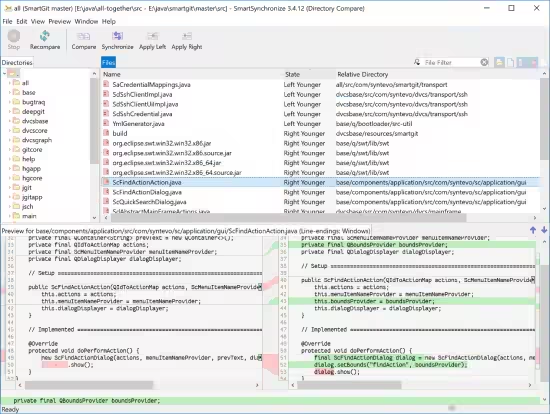
The Directory Compare allows you to compare two directory structures of your local file system. The directory structures are displayed as one structure; files and directories that are only available in one directory structure are displayed partly. To give you a quick overview of the changes, the number of added, removed and modified lines is displayed for each file.
The preview pane at the lower part of the window allows convenient navigation between changes. It lets you examine the detailed changes without the need to open a separate File Compare window for each file.
3-Way-Merge
The 3-Way Merge is an important extension to the File Compare. It helps you to merge two independent changes of one base file - usually the result of two people making different changes to the same file. As with the File Compare, you can edit any of the three files (provided they are editable), and the change coloring will update automatically.
HOMEPAGEhttps://www.syntevo.com/smartsynchronize/
DOWNLOAD https://rapidgator.net/file/34cb8779bafdf3750c64d6ff7e30534f/SmartSynchronize_4.6.3..rar.html
https://nitroflare.com/view/B56328344AE2661/SmartSynchronize_4.6.3..rar

 Cantinho Satkeys
