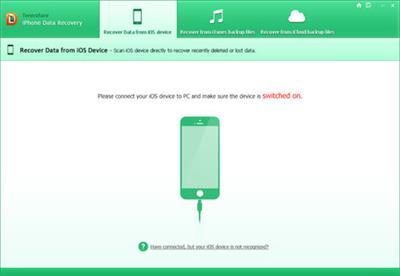
Tenorshare iPhone Data Recovery 6.7.1.1 Build 2.1.2016 | 48.58 MB
Quick, Safe and Complete Software for Recovering Lost iPhone Data. A life saver for those who lost iPhone data. Easily retrieve lost photos, contacts, SMS, notes, WhatsApp/Viber/Tango messages/voicemail, call history, App Data (Instagram, Viber, Flickr, iPhoto) and totally 20 types of files. Fully support iPhone 6s Plus/6s/6+/6/5s/5c/5/4s/4 iTunes 12.3 and iOS 9.
Top 10 Reasons Lost iPhone Data
- Deleted data due to misoperation
- New iOS update on your iPhone
- Factory settings restore or device reset
- iPhone jailbreak
- iPhone got damaged, crashed, smashed
- iPhone stuck in Apple logo, black/white screen of death, iPhone is inaccessible
- iPhone is attacked by virus
- iPhone is locked by a forgotten passcode
- Replace iPhone battery
- iTunes can not recognize your iPhone and you can not restore from iTunes backup
iPhone Data Recovery without Backup
Recover data directly from iPhone 6s/6s Plus, iPhone 6/6+, iPhone 5s/5c/5, iPhone 4s/4, iPhone 3gs. Super easy and no backup files needed.
iTunes Data Recovery Restore iPhone Data from iTunes Backup
Extract iPhone data from previous backup file. No need to connect your iPhone to computer. Quick convenient when your iPhone is lost, stolen or seriously-damaged. Even if your iTunes backup is deleted or lost, you could still get back deleted iTunes backup and extract data.
Restore iPhone Data from iCloud Backup
Restore iPhone data from iCloud backup. It would not overwrite the current data existing on your iPhone. It ensures the data safety as you can download iCloud backup to local computer.
Preview and Backup iPhone Data to Local Computer
iPhone Data Recovery allows you to transfer data from iOS devices to personal computer freely. You can preview your data specific contents, time, name, etc. of your SMS, call history, etc. before recovery. All scanned files will be displayed in the preview window in category. Just click the file type and see the detailed information.
It also helps you extract data from unreadable iTunes backup file and save them on your local computer freely. iPhone Data Recovery Software can export your lost files in .txt, .xls, .xml,.jpg, .png etc. iPhone contacts can also be saved as VCF/Vcard file.
Sync Contents to iPhone
iPhone Data Recovery now supports to sync recovered contacts, messages and notes directly to iPhone.
- Sync videos, photos, text messages, contacts to iPhone.
- Videos will be converted to iPhone-compatible format during the transfer.
- All your files will be kept intact. No data loss.
iPhone Data Recovery System Requirements:
- Windows 10/Windows 8.1/Windows 8/Windows 7/Vista/Windows XP (32-bit/64-bit)
- CPU: 1GHz (32 bit or 64 bit) and above
- RAM: 256 MB or more of RAM (1024MB Recommended)
- 200 MB free space and above
- iTunes pre-installed in your computer
What's New in Version 6.7.1.1:
- May include unspecified updates, enhancements, or bug fixes.
Buy a premium to download file with fast speedthanks
Rapidgator.nethttp://rapidgator.net/file/211c3096f949d842f8cc0b3c555c29a8/n3lpx.T.iP.D.R.6.7.1.1.B.2.1.2016.rar.htmlalfafile.nethttp://alfafile.net/file/R5qp/n3lpx.T.iP.D.R.6.7.1.1.B.2.1.2016.rar
 Cantinho Satkeys
