* Cantinho Satkeys

Refresh History
  • FELISCUNHA: ghyt74  pessoal   49E09B4F
    21 de Agosto de 2026, 11:28
  • JP: try65hytr Pessoal 4tj97u<z 2dgh8i k7y8j0 classic
    21 de Agosto de 2026, 05:22
  • JP: try65hytr Pessoal 4tj97u<z 2dgh8i k7y8j0 43e5r6
    17 de Agosto de 2026, 04:09
  • j.s.: dgtgtr a todos  49E09B4F
    15 de Agosto de 2026, 15:07
  • FELISCUNHA: ghyt74   49E09B4F  e bom fim de semana  4tj97u<z
    15 de Agosto de 2026, 11:45
  • Alberto: Revistas
    15 de Agosto de 2026, 05:32
  • JP: try65hytr Pessoal 4tj97u<z 2dgh8i k7y8j0
    14 de Agosto de 2026, 05:05
  • j.s.: try65hytr try65hytr a todos  49E09B4F 49E09B4F
    11 de Agosto de 2026, 20:26
  • JP: try65hytr Pessoal 2dgh8i k7y8j0 r4v8p
    11 de Agosto de 2026, 04:30
  • FELISCUNHA: ghyt74   4tj97u<z  votos de um santo domingo para todo o auditório  101041
    09 de Agosto de 2026, 11:37
  • cereal killa: ghyt74 e bom fim de semana com muita chupadelas  r4v8p p0i8l
    08 de Agosto de 2026, 11:35
  • FELISCUNHA: ghyt74   49E09B4F  e bom fim de semana   4tj97u<z
    07 de Agosto de 2026, 11:56
  • JP: try65hytr Pessoal  2dgh8i k7y8j0 43e5r6
    07 de Agosto de 2026, 05:31
  • j.s.: dgtgtr a todos  49E09B4F 49E09B4F
    05 de Agosto de 2026, 13:50
  • FELISCUNHA: ghyt74  pessoal   49E09B4F
    05 de Agosto de 2026, 11:22
  • JP: dgtgtr Pessoal  4tj97u<z 2dgh8i k7y8j0
    03 de Agosto de 2026, 18:43
  • FELISCUNHA: dgtgtr   49E09B4F  e bom fim de semana  4tj97u<z
    01 de Agosto de 2026, 12:21
  • JP: try65hytr A Todos  4tj97u<z 2dgh8i k7y8j0 yu7gh8
    31 de Julho de 2026, 05:35
  • j.s.: ghyt74 a todos
    30 de Julho de 2026, 09:51
  • FELISCUNHA: ghyt74  pessoal  49E09B4F
    29 de Julho de 2026, 10:49

Autor Tópico: Screen GIF 2016.4  (Lida 540 vezes)

0 Membros e 1 Visitante estão a ver este tópico.

Offline rollroy

  • Digital Satkeys
  • *
  • Mensagens: 2086
  • Karma: +0/-0
Screen GIF 2016.4
« em: 07 de Maio de 2019, 13:24 »
Screen GIF 2016.4


Screen GIF 2016.4 | 3.10 MB

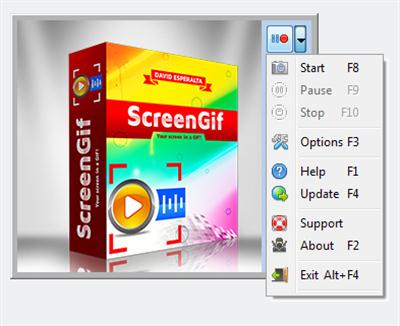
Screen GIF - This program allows you to capture GIF images directly from your screen. Anything which occur in your screen can be easly captured by Screen GIF and then saved it directly as a GIF animated image. All in an extremelly easy to use program interface really simple and powerful.


Features:

Extremelly easy to use Run the program and use start/stop controls to record GIF's.
Simple GIF images editor The incorporated GIF editor allows you to customize your GIF's.
Various GIF optimizations Various optional GIF optimizations for smaller GIF images.
Grayscale captures Captures images in grayscale to reduce the total GIF size.
Scale percentage Captures images scaling by a percentage for a less GIF size.
Program install assistant Screen GIF can be installed and uninstalled with safety and easily.
Program updater assistant Check for new versions and download directly from the program.
Multilanguage interface The Screen GIF user interface is available in various languages.
And many, many more Discover how Screen GIF can be useful to you!

Changelog:
v2016.4 (2016-01-08):

-Update Inno Setup to the latest version, which means, between other things, that the program's installer creates a shortcut to the main executable in the common Start Menu Programs folder instead of creating a new Start Menu , following a Microsoft recomendation.

OS: XP/Vista/7/8/10
Language: English / Spanish

Buy a premium  to download file with fast speed
thanks
Rapidgator.net
http://rapidgator.net/file/3ae6109261f988df8c479ff4b328dcf2/0bpa8.S.GIF.2016.4.rar.html
