* Cantinho Satkeys

Refresh History
  • cereal killa: dgtgtr pessoal  wwd46l0' 4tj97u<z
    01 de Maio de 2026, 12:22
  • JPratas: try65hytr A Todos  4tj97u<z classic 2dgh8i k7y8j0
    01 de Maio de 2026, 05:05
  • FELISCUNHA: ghyt74  pessoal   49E09B4F
    30 de Abril de 2026, 11:12
  • JPratas: try65hytr Pessoal 4tj97u<z k7y8j0 yu7gh8
    30 de Abril de 2026, 05:52
  • j.s.: dgtgtr a todos  49E09B4F
    28 de Abril de 2026, 16:09
  • FELISCUNHA: ghyt74  pessoal   49E09B4F
    24 de Abril de 2026, 11:01
  • JPratas: try65hytr A Todos  k7y8j0 classic
    24 de Abril de 2026, 04:11
  • JPratas: try65hytr Pessoal  4tj97u<z 2dgh8i k7y8j0 yu7gh8
    23 de Abril de 2026, 05:46
  • FELISCUNHA: ghyt74  49E09B4F e bom fim de semana  4tj97u<z
    18 de Abril de 2026, 10:58
  • j.s.: tenham um excelente fim de semana  49E09B4F 49E09B4F
    18 de Abril de 2026, 08:56
  • j.s.: ghyt74 a todos  49E09B4F
    18 de Abril de 2026, 08:55
  • FELISCUNHA: ghyt74  pessoal  4tj97u<z
    17 de Abril de 2026, 11:39
  • JPratas: try65hytr Pessoal  2dgh8i k7y8j0 yu7gh8
    17 de Abril de 2026, 06:16
  • j.s.: dgtgtr a todos  49E09B4F
    16 de Abril de 2026, 15:41
  • Marceloo: eagles
    14 de Abril de 2026, 13:59
  • FELISCUNHA: ghyt74  pessoal  49E09B4F
    10 de Abril de 2026, 10:44
  • JPratas: try65hytr Pessoal  4tj97u<z 2dgh8i k7y8j0 yu7gh8
    10 de Abril de 2026, 06:02
  • FELISCUNHA: dgtgtr  pessoal   49E09B4F
    06 de Abril de 2026, 12:16
  • j.s.: 4tj97u<z 4tj97u<z
    04 de Abril de 2026, 23:44
  • j.s.: um santo domingo de Páscia  43e5r6 43e5r6
    04 de Abril de 2026, 23:44

Autor Tópico: Starter Toolkit May 2016 2.0  (Lida 417 vezes)

0 Membros e 1 Visitante estão a ver este tópico.

Offline rollroy

  • Digital Satkeys
  • *
  • Mensagens: 2086
  • Karma: +0/-0
Starter Toolkit May 2016 2.0
« em: 20 de Abril de 2019, 00:30 »
Starter Toolkit May 2016 2.0


Starter Toolkit May 2016 2.0 | 379.43 MB

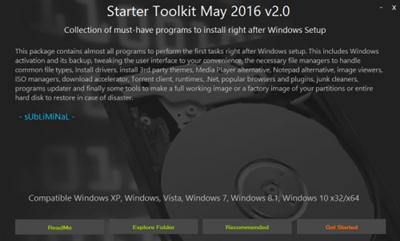
Collection of must-have programs to install right after Windows Setup. This package contains almost all programs to perform the first tasks right after Windows setup. This includes Windows activation and its backup, tweaking the user interface to your convenience, the necessary file managers to handle common file types, Install drivers, install 3rd party themes, Media Player alternative, Notepad alternative, image viewers, ISO managers, download accelerator, Torrent client, runtimes, .Net, popular browsers and plugins, junk cleaners, programs updater and finally some tools to make a full working image or a factory image of your partitions or entire hard disk to restore in case of disaster.
Credits and Thanks:


- RadiXX11, Xanax, MaRk15n, Ratiborus, BadPointer, Vandit, Ricktendo and niT�_RiDeR_Pr0.
- All the other contributors to this project.

Recommended:
1- Do a windows fresh install
2- Activate Windows
3- Install 7-Zip and/or WinRar first (maybe you will need to decompress a file before installing it)
4- Install all programs you need and configure them to your likings
5- Clean junk from your system including unnecessary files and navigators history
6- Defrag your windows partition
7- Backup your partition or the entire hdd using the provided programs or the downloaded boot cds

Changelog (May 21):

7-Zip v16.02 Updated
IDM 25 Build 18 Updated
WinAero Tweaker v0.5.0.6 Updated
Added other programs to download
Other minor changes to the theme

Buy a premium  to download file with fast speed
thanks
Rapidgator.net
http://rapidgator.net/file/98694534ca6fcadc5aa996818938b1e2/b6789.S.T.M.2016.2.0.7z.html
