 Free Download SmartGit 26.1.051 Multilingual | 133.6 MbSmartGit
 is a graphical Git client for developers who need a visual environment for managing repositories, branches, commits, merges, and code changes. It provides a consistent interface across Windows, macOS, and Linux while supporting workflows for both new and experienced Git users.
The application integrates with GitHub, Bitbucket, GitLab, and Azure DevOps, allowing users to work with repositories and manage pull requests and review comments from within the Git client. It also includes Git, SSH, comparison, merging, and branch-management tools without requiring separate Git utilities.
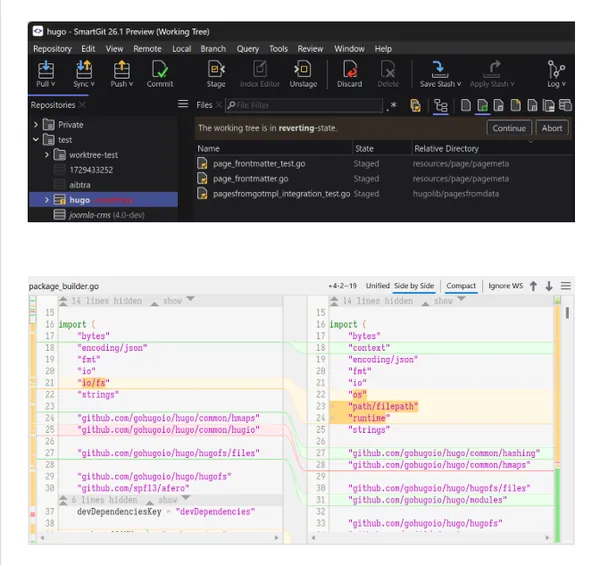
SmartGit provides a graphical workspace for working with Git repositories and reviewing project history. Its interface includes graphical merge and commit history views, while drag-and-drop operations can be used for tasks such as reordering commits, merging, and rebasing.
The client includes dedicated tools for comparing and merging files. Its Conflict Solver provides an editable environment for resolving merge conflicts, while syntax coloring and configurable views help adapt the interface to different development workflows.
SmartGit also includes Git-Flow support for higher-level branch management and comes with an integrated Git client and SSH client. Repository work can be performed with Git hosting services supported by its integrations or with other Git repositories and hosting providers.
Key Features- Graphical Git client for Windows, macOS, and Linux.
- View graphical merge and commit history.
- Reorder commits using drag and drop.
- Perform merges and rebases through the graphical interface.
- Work efficiently with larger repositories.
- Integrate with GitHub.
- Integrate with Bitbucket and Bitbucket Server.
- Integrate with GitLab.
- Integrate with Azure DevOps.
- Create and resolve Pull Requests and Review Comments.
- Compare files with the built-in File Compare tool.
- Resolve conflicts using the editable Conflict Solver.
- Manage branches with Git-Flow.
- Use the bundled Git client.
- Use the integrated SSH client.
- Configure merge and rebase preferences.
- Use external tools and comparison or conflict-resolution tools.
- Customize syntax coloring.
- Configure keyboard shortcuts.
- Adjust the layout of selected views.
- Customize toolbars.
- Choose between light and dark themes.
Why Choose SmartGitSmartGit is suited to developers who prefer visual Git management instead of relying exclusively on command-line operations. Its graphical history, merge, rebase, comparison, and conflict-resolution tools bring common repository tasks into a single desktop interface.
Integration with major Git hosting platforms makes it useful for development teams working with pull requests and review comments, while its configurable interface allows users to adapt the client to their established workflows.
System RequirementsWindows, macOS, and Linux
Home Pagehttps://www.syntevo.com/smartgit/
Product Information- Software Name: SmartGit
- Version: 26.1.051
- Languages: Multilingual
- License type: Full Version
- File Size: 133.6 Mb
Recommend Download Link Hight Speed | Please Say Thanks Keep Topic Live
Links are Interchangeable - No Password - Single Extraction

 Cantinho Satkeys
