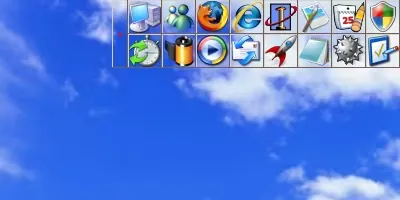
 Free Download Launcher 5.1.1 Multilingual | 6.1 MbLauncher
 is a lightweight application launcher for Windows that provides a convenient way to organize and access files, folders, programs, and system functions from a customizable interface. It offers an alternative to the standard Windows Start menu by allowing users to launch frequently used items with a simple mouse click.
Designed for speed and low resource usage, Launcher can be used on different types of systems, including portable environments. Its flexible layout, customization options, and support for shortcuts make it suitable for users who want faster access to their everyday tools and files.
The software provides features such as customizable pages, hotkeys, visual adjustments, clipboard management, and additional utilities to improve desktop productivity.
Launcher provides a customizable launch bar that helps users organize and start applications, documents, folders, and other files from a single interface. The program can work independently from fixed drive letters, making it suitable for use with removable storage devices such as USB drives.
The application supports both an installed version and a portable ZIP version. It allows users to arrange icons freely, customize the launcher window position, adjust transparency effects, and configure different display behaviors according to personal preferences.
Additional built-in tools include clipboard management, battery information, screen magnification, monitor brightness control, and network popup message support.
Key Features- Fast and lightweight alternative application launcher for Windows
- Launch files, folders, and programs with a single mouse click
- Available as installed version or portable ZIP package
- Works independently from assigned drive letters
- Customizable icon arrangement and launcher pages
- Supports hotkeys and special shortcut functions
- Adjustable window position, transparency, and display behavior
- Allows custom wallpapers and frameless window layouts
- Provides clipboard management for frequently used text
- Includes battery indicator, screen magnifier, and brightness control tools
- Supports multiple interface languages
Why Choose LauncherLauncher is designed for users who want a faster and more organized way to access frequently used software and files. Its small size and low resource consumption make it suitable for everyday desktop use as well as portable setups.
The customizable interface allows users to create a personal workspace with quick access tools, shortcuts, and additional system utilities.
System RequirementsWindows operating system
Frequently Asked QuestionsWhat is Launcher used for?Launcher is used to organize and quickly start applications, files, folders, and shortcuts through a customizable launch interface.
Does Launcher support portable usage?Yes. The software is available as a ZIP version that can be used without a traditional installation process.
Can the Launcher interface be customized?Yes. Users can adjust icon layouts, window position, transparency, wallpapers, and other visual settings.
What languages does Launcher support?Launcher supports multiple languages including German, English, French, Italian, Spanish, Hungarian, Russian, and Chinese.
Home Pagehttps://launcher-online.de/en
Product Information- Software Name: Launcher
- Version: 5.1.1
- Languages: Multilingual
- License type: Full Version
- File Size: 6.1 Mb
Recommend Download Link Hight Speed | Please Say Thanks Keep Topic Live
Links are Interchangeable - No Password - Single Extraction

 Cantinho Satkeys
