SlickEdit Pro 2021 26.0.3.1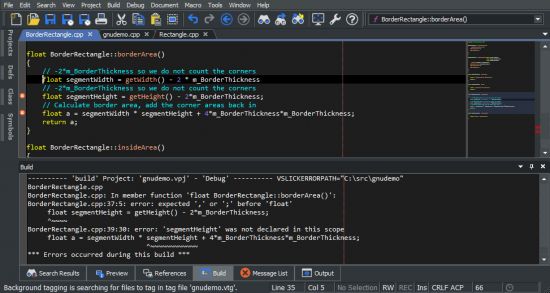
SlickEdit Pro 2021 26.0.3.1 | File size: 469 MB
Build or compile your project, then double-click on an error message in the Build window to jump to that location. Errors and warnings are marked with an icon in the left margin. In addition, the overview bar, positioned alongside the vertical scrollbar, marks the position of errors and warnings relative to the current scroll position in the document. To quickly scroll a marked location into view, you can drag the scrollbar slider to the mark, or click on the mark itself.SlickEdit Pro: Build and debug large or complex projects. Stay in sync with version control integration and powerful file differencing tools. All your project's symbols are tagged for quick and easy lookup, analysis, and navigation.
Whichever edition you choose, enjoy fast startup, smart editing features, and increased productivity.
Files and Editing
Multiple Document Group Interface
The MDI layout has been completely rewritten to support multiple groups of document tabs. Document tabs (and groups of tabs) can be floated as separate top-level windows, allowing better use of multiple monitors Files can be dragged and dropped to move between tab groups or to create new groups. The new document tabs offer much better performance than the previous File Tabs tool window, better supporting users who prefer to keep many files open.
Surround With
Use to surround existing lines of code with a new structure such as: if, for, while, and try. The existing code is automatically placed inside braces and indented. Additional structures can also be defined for Surround With.
SmartPaste�
Automatically formats line selections when pasted. The pasted code is formatted to match the indentation of the new location and the brace style adjusted to match your settings.
Dynamic Surround
Surround existing lines of code with block statements or tags. Dynamic Surround allows you to expand a block after syntax expansion, using the arrow keys to move the end of the block up or down. Surround With allows you to select lines and then choose a block structure or tag.
Beautifier
The built-in beautifier allows very fine-grained control over source formatting options for C++, Objective-C, Java, j?vascript, PHP, XML, or HTML. You can pick from one of several pre-existing profiles and save your modifications to create your own profiles. Source can be beautified on demand using any of the profiles and can be configured to beautify as you type using your preferred beautifier settings.
Beautify While Typing
When the "Beautify while typing" feature is enabled for C++, Object-C, Java, j?vascript, XML, or HTML, your code will be automatically beautified when you type ';', '{' or '}'. This improves the consistency of your code and produces more readable code with better spacing.
SlickEdit is the first product to beautify C++ as you type. Even with the complexity and ambiguous syntax of C++, re-spacing options for all operators including * are supported.
Syntax Expansion
Expands common block structures (if, for, try, ...) when the initial keyword is typed. For example, when "if" is typed followed by a space, SlickEdit inserts the parentheses for the condition and the braces. You can define additional structures to be expanded.
Auto-Completions
Completions reduce keystrokes by automatically completing symbols as you type. After typing the first few characters of a symbol, a brief pause will pop up a list of possible completions. This list is comprised of matching symbols in the tag database and matching lines of code in the current buffer. If a line match is selected you can add successively more text from that line using the complete-more command (Ctrl+Shift+Space).
and more...
Whats New
https://www.slickedit.com/products/slickedit/new-featuresHomepage
https://www.slickedit.com/DOWNLOAD LINKS :
https://nitro.download/view/7F287E2C4CFA5CF/SlickEditPro2021.rar

https://rapidgator.net/file/3dfd61ba5f9ae4030f9adbac957358db/SlickEditPro2021.rar.html

 Cantinho Satkeys
