MP4 | Video: h264, 1280x720 | Audio: AAC, 44.1 KHz, 2 Ch
Genre: eLearning | Language: English + srt | Duration: 14 lectures (1h 45m) | Size: 1.5 GB
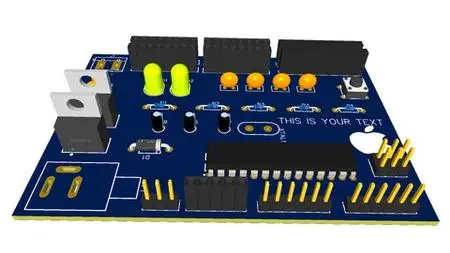
Make Your Own Arduino Board in less than 2 hours and Add your Name on It
What you'll learn:You'll learn how to make Your Own arduino board
You'll print your Name or Brand In your Own built Arduino Board
Doing A simple projects With the Board
RequirementsDesktop Computer Or laptop
Have enough Time and Patience To learn
Interested in Electronics
DescriptionIn this Course you'll learn how to make Your Own Custom Arduino Circuit Board Step by Step from start to finish , This Course Will help you improving Your PCB Boards Design Skills in order to Get Started In Freelancing , To get a job in PCB design .
-----------------------------------------------------------------------------------------------------------------------------------------------------------
EasyEda Designer is a Powerful Software
The Software used in this Course is EasyEda , it is a professional software used to design all kind of boards , It is one of the most used software for electronic design , other features include the creation of a bill of materials, Gerber files and pick and place files and documentary outputs in PDF, PNG and SVG formats , Learning EasyEda is useful for everyone planning or already working in electronics , This Course is Compatible with all Levels From Beginners to Experts .
-----------------------------------------------------------------------------------------------------------------------------------------------------------
What you should expect after taking this course:
Sign up to Circuit design software and Start to Use it .
Get Started Designing PCB Boards Using EasyEda Software.
Create your Own Custom Arduino Circuit Board With Customizable Shapes .
Create your Own Custom Arduino Circuit Board With Name Or Brand Printed on it.
Create your Own Custom Arduino Circuit Board Schematic :
⇒ From Zero to Finish.
⇒ From Template .
Get a list of all the electronic components needed for The Board.
Searching components in The Software.
Learn the role of each electronic component in the Circuit .
Wiring components in Schematic view.
Transfer schematic into PCB.
Place Electronic components on board.
Route layers.
Autoroute layers to save effort & time.
Dealing with design errors.
Generate Gerber files needed for manufacturing.
Who this course is forFor anyone who's interested in Electronics (College / University students , Junior / Senior hardware design engineers , Beginners, Hobbyists)
For anyone Who would like To Make his Own Arduino Board
For anyone Who Wants to have An Custom Board with His Name or Brand Printed On it
Download link:
Só visivel para registados e com resposta ao tópico.Only visible to registered and with a reply to the topic.Links are Interchangeable - No Password - Single Extraction

 Cantinho Satkeys
