* Cantinho Satkeys

Refresh History
  • okapa:
    24 de Dezembro de 2025, 19:01
  • sacana10: A todos um feliz natal
    24 de Dezembro de 2025, 17:57
  • cereal killa: dgtgtr passei por ca para vos desejar feliz natal e familias  :smiles_natal:
    24 de Dezembro de 2025, 15:46
  • bruno mirandela: deso a todos um feliz natal
    24 de Dezembro de 2025, 14:31
  • FELISCUNHA: ghyt74   :34rbzg9:  e bom natal  :13arvoresnatalmagiagifs:
    24 de Dezembro de 2025, 10:15
  • tgh12: mikrotik
    24 de Dezembro de 2025, 07:49
  • tgh12: Spanish for Beginners: Spanish from 0 to Conversational
    24 de Dezembro de 2025, 04:57
  • JPratas: try65hytr Pessoal  4tj97u<z
    24 de Dezembro de 2025, 03:03
  • m1957: Para toda a equipa e membros deste fórum, desejo um Natal feliz e que o novo ano de 2026, seja muito próspero a todos os níveis.
    24 de Dezembro de 2025, 00:47
  • FELISCUNHA: Bom dia pessoal   :34rbzg9:
    22 de Dezembro de 2025, 10:35
  • j.s.: :13arvoresnatalmagiagifs:
    21 de Dezembro de 2025, 19:01
  • j.s.: try65hytr a todos  :smiles_natal: :smiles_natal:
    21 de Dezembro de 2025, 19:01
  • FELISCUNHA: ghyt74  49E09B4F  e bom fim de semana  4tj97u<z
    20 de Dezembro de 2025, 11:20
  • JPratas: try65hytr Pessoal  2dgh8i k7y8j0 classic dgf64y
    19 de Dezembro de 2025, 05:26
  • cereal killa: ghyt74 e boa semana de chuva e frio  RGG45wj erfb57j
    15 de Dezembro de 2025, 11:26
  • FELISCUNHA: Votos de um santo domingo para todo o auditório  4tj97u<z
    14 de Dezembro de 2025, 09:28
  • j.s.: tenham um excelente fim de semana com muitas comprinhas  :13arvoresnatalmagiagifs: sdfgsdg
    13 de Dezembro de 2025, 14:58
  • j.s.: dgtgtr a todos  :smiles_natal:
    13 de Dezembro de 2025, 14:57
  • FELISCUNHA: dgtgtr   49E09B4F  e bom fim de semana   :34rbzg9:
    13 de Dezembro de 2025, 12:29
  • JPratas: try65hytr Pessoal  4tj97u<z 2dgh8i classic bve567o+
    12 de Dezembro de 2025, 05:34

Autor Tópico: Retouching and Compositing 360 Degree Photos in Photoshop  (Lida 158 vezes)

0 Membros e 1 Visitante estão a ver este tópico.

Offline mitsumi

  • Sub-Administrador
  • ****
  • Mensagens: 129146
  • Karma: +0/-0
Retouching and Compositing 360 Degree Photos in Photoshop
« em: 15 de Junho de 2021, 10:20 »

MP4 | Video: h264, 1280x720 | Audio: AAC, 44.1 KHz, 2 Ch
Genre: eLearning | Language: English | Duration: 17 Lessons (1h 1m) | Size: 525.8 MB

CLASS DESCRIPTION
Level-Up Your 360º VR Images By Combining Graphics And Branding Elements
AFTER THIS CLASS YOU'LL BE ABLE TO:
Work non-destructively with linked Smart Objects and 3D Textures.
Seamlessly remove elements from a 360º photo.
Create adjustments without causing a 'seam' in the final composite.
Techniques for removing yourself (and others) from a 360 shoot.
Introduce 2D artwork (including logos) without distortion.
ABOUT CHRIS' CLASS:
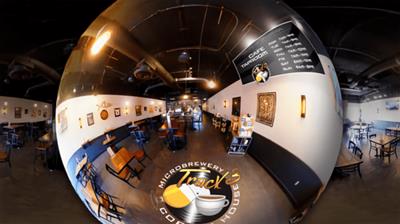
VR photography is here, right now. Billions of people are rotating and exploring 360º photos in Facebook, Google Streetview, hotel and resort websites, and automotive sales apps.

So, what's missing? Retouching and branding!

Learn to seamlessly remove the tripod and introduce new artwork into your 360º (VR) photos - without leaving Photoshop. Learn how to edit, enhance, and augment this engaging photographic experience with custom branding and retouching techniques using the Spherical Panorama and 3D tools inside of Photoshop. We'll also cover some shooting tips and workflows for removing yourself and others from a shot, combining bracketed photos together, and mapping 2D artwork into the 3D spherical environment.

WHO THIS CLASS IS FOR:
Photo retouchers and compositors
Real Estate, Hotel, Resort, and Restaurant photographers
Graphic Designers
Product photographers (automotive, interior design, virtual tours)
SOFTWARE USED:
Adobe Photoshop CC 2021
Ricoh Theta App (optional)


Download link:
Só visivel para registados e com resposta ao tópico.

Only visible to registered and with a reply to the topic.

Links are Interchangeable - No Password - Single Extraction
